

Canary Setup and Pipeline #
This document explains how to set up BP Canary and configure the canary pipeline. For the concept and rollout approach, see Canary Deployment.
How to set up BP Canary #
BuildPiper supports canary deployments out of the box, but there are still a few configurations that need to be enabled to effectively use canary analysis in an automated workflow. The details are described below:
| Steps | Configuration Area | Mandatory | Description |
|---|---|---|---|
| 1 | Prerequisite Configurations (System Settings) | Yes | Complete the prerequisite system-level configurations required before creating and executing Canary deployments. |
| 2 | Monitoring Source Configuration | No | Configure the monitoring platform that will provide the metrics required for Canary analysis. |
| 3 | Creating a Baseline and Canary Pipeline | Yes | Create a deployment pipeline that performs progressive Canary rollouts by phasing out baseline and introducing the canary versions in controlled stages. |
| 4 | Canary Workflow Approvals | Yes | Configure the approval mechanism used between rollout stages. |
| 5 | Canary Rollback Execution | NA | Execute a rollback to the stable baseline deployment if the deployment fails or canary analysis indicates deployment failure or instability. |
To configure the optional steps, see Monitoring Source, Stability Matrix and Canary Analysis Template.
1.Prerequisite Configurations (Update of System Settings) #
There are handful configurations at the system level that needs to configure prior to the canary.
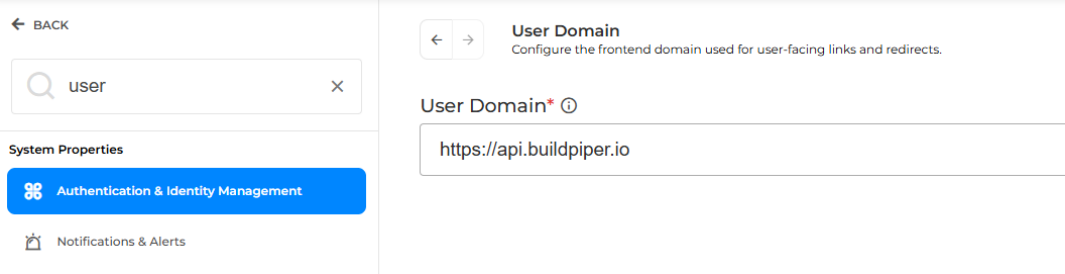
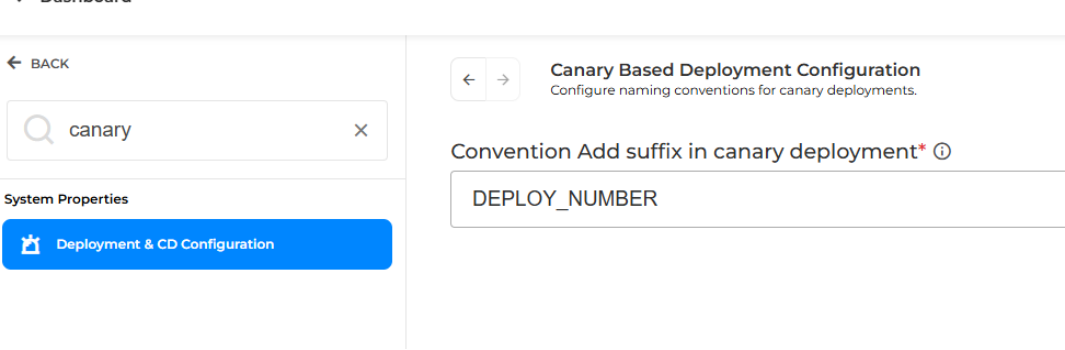
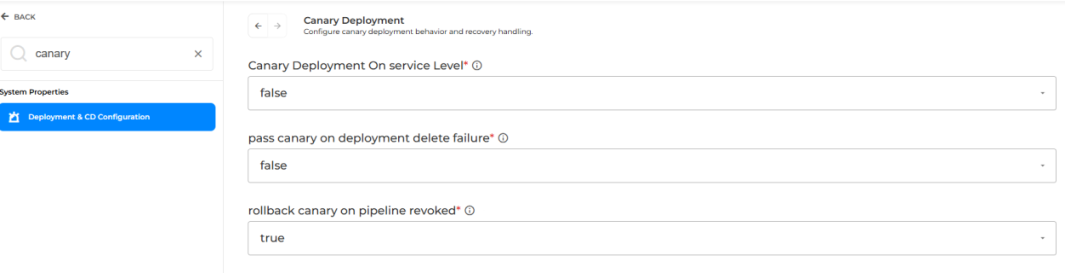
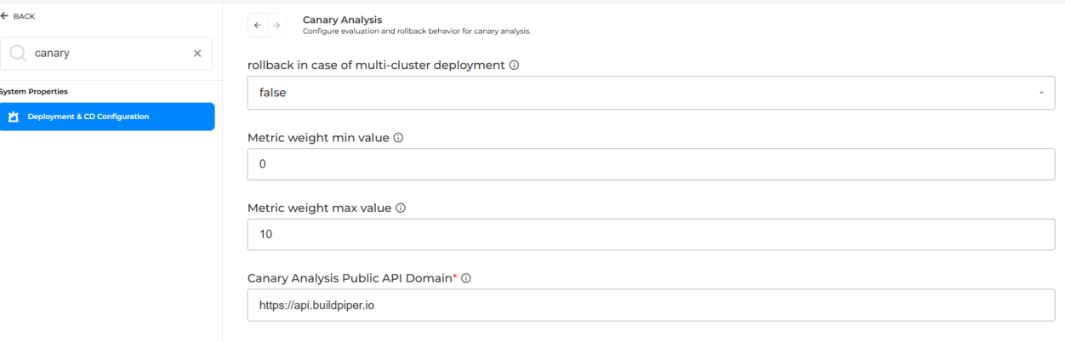
1. User Domain 2. Canary-Based Deployment Configuration 3. Canary Deployment 4. Canary Analysis 5. Canary pre-check
| Configuration Component | Description |
|---|---|
| Canary Deployment | Canary Deployment is a service-level configuration that controls canary deployment behaviour, including service-level enablement, failure handling, and rollback actions. The settings are configurable using true or false values. Canary Deployment On Service Level – Controls whether canary deployment behavior is enabled at the service level. Pass Canary on Deployment Delete Failure – Determines whether the canary deployment should be considered successful if deployment deletion fails. Rollback Canary on Pipeline Revoked – Determines whether the canary deployment should be rolled back when the associated pipeline is revoked. |
| Canary Analysis | A configuration setting that defines the evaluation and decision-making criteria for canary deployments, allowing users to control analysis behaviour such as rollback conditions for multi-cluster deployments and metric threshold boundaries used to assess deployment health. Rollback in Case of Multi-Cluster Deployment – Determines whether a rollback is triggered across clusters when a canary deployment in a multi-cluster environment encounters a failure. Metric Weight Min Value: Defines the minimum permitted weight assigned to a metric during canary analysis. Metric Weight Max Value: Defines the maximum permitted weight assigned to a metric during canary analysis. Canary Analysis Public API Domain: Specifies the public API endpoint used for canary analysis operations. |
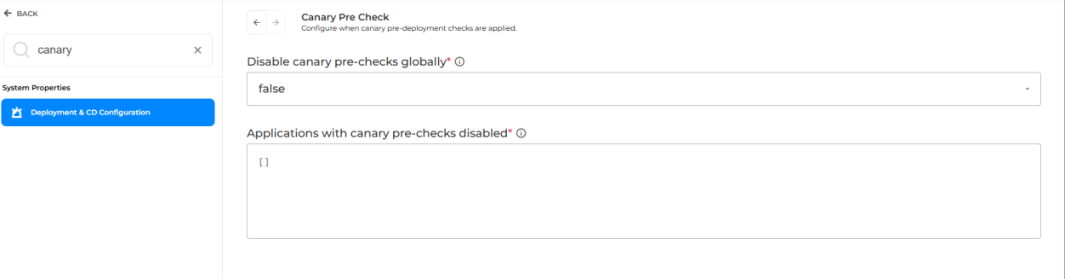
| Canary Pre-Check | Canary Pre-Check is a configuration setting that controls whether pre-deployment validation checks are performed before a canary release. It allows users to disable these checks globally or selectively exclude specific applications from pre-check validation. Pre-Deployment Checks The following validations are performed before initiating a canary deployment: Baseline Deployment Validation: Verifies whether a baseline deployment is configured and available before proceeding with the canary deployment. HPA (Horizontal Pod Autoscaler) Validation: Checks whether an HPA is configured for the application before initiating the canary deployment. These checks help ensure that the required deployment configuration is in place before a canary release begins. Disable Canary Pre-Checks Globally: Determines whether canary pre-deployment checks are disabled globally. When set to false, pre-checks remain enabled by default. Applications with Canary Pre-Checks Disabled: Specifies the list of applications for which canary pre-checks should be skipped. An empty list indicates that no applications are explicitly excluded. |
User Domain
Canary Based Deployment Configuration
Canary Deployment
Canary Analysis
Canary Pre Checks
2. Canary Pipeline #
Please note the canary deployment is recommended to be performed via Pipeline only.
Canary deployment expects a baseline deployment to already exist. In case canary deployment is attempted without baseline deployment, canary deployment will exit and fail. Therefore for canary deployment demo we will have to prepare two pipelines
•Baseline Deployment Pipeline •Canary Deployment Pipeline
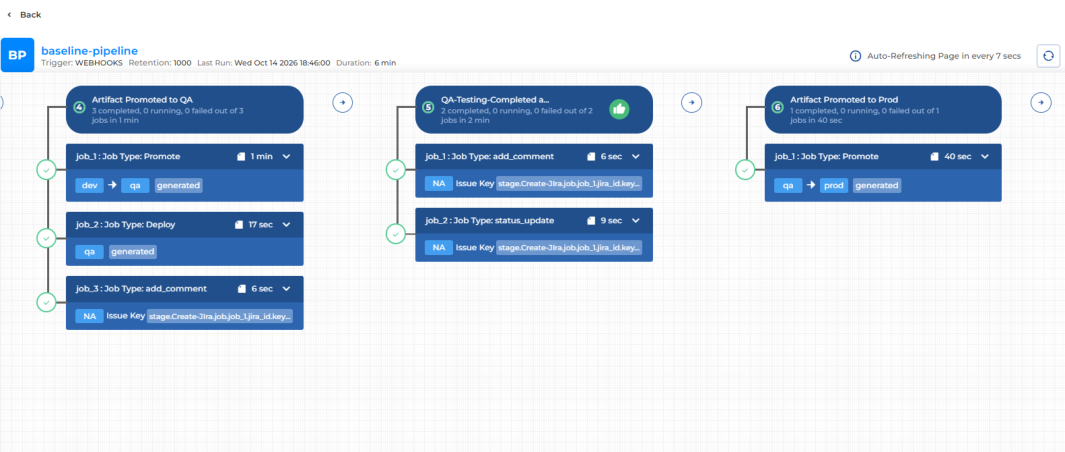
Baseline Deployment Pipeline #
In the baseline deployment pipeline artefact is being built and deployed using the rolling deployment strategy
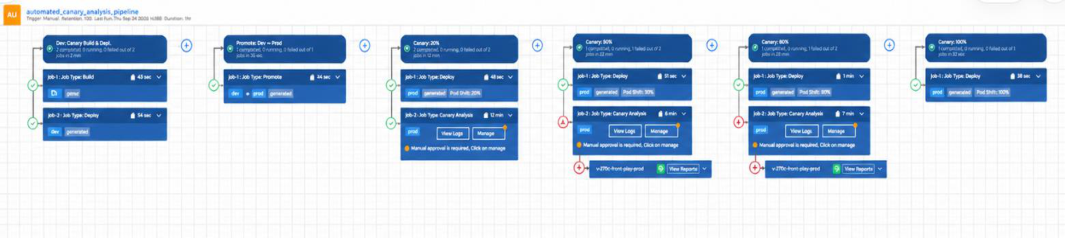
Canary Pipeline #
After the baseline pipeline execution, the canary pipeline can be triggered
2.1 Pipeline Level Configuration for Canary Deployment #
There are two jobs in the pipeline that need to be configured for the canary configuration; these are elaborated below:
•Deployment Job of Pipeline.
•Canary Analysis Job of the Pipeline.
Deployment Job of the pipeline: #
•Deployment Strategy: By default, the deployment strategy is pipeline is configured to Rolling ; we need to update it to
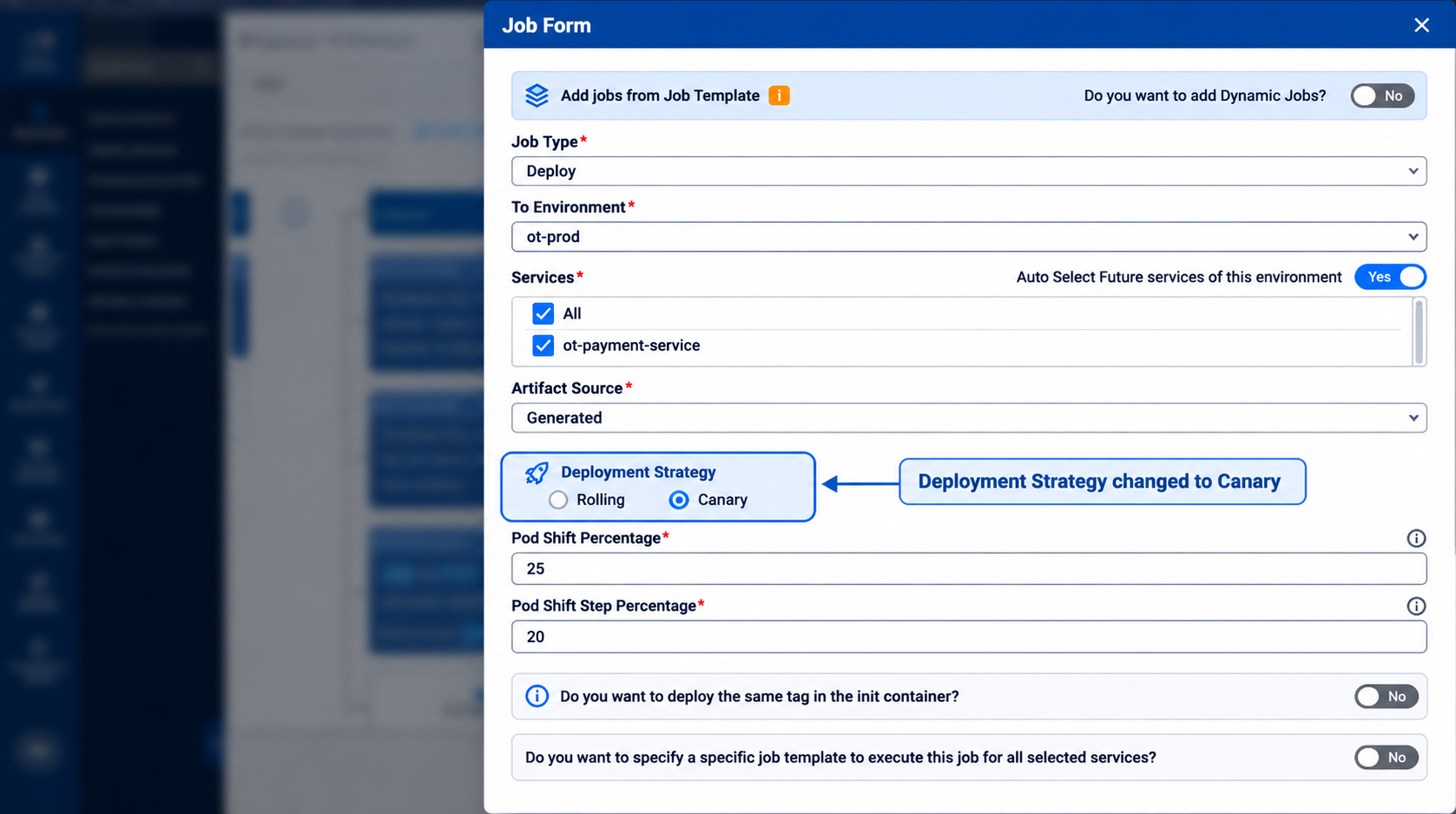
•Pod Shift Percentage The total percentage of pods that will be shifted to the canary deployment during the rollout.
Example: Stable Deployment: 20 pods Pod Shift Percentage: 50% Result: •10 pods remain on the stable version.
•10 pods run the canary version.
•Pod Shift Step Percentage The incremental percentage by which pods are shifted during each rollout step until the target Pod Shift Percentage is reached.
Example: #
Total Pods: 20 Pod Shift Percentage: 50% Pod Shift Step Percentage: 10%
•The rollout progresses as:
| Step | Stable Pods | Canary Pods |
|---|---|---|
| Initial | 20 | 0 |
| Step 1 (10%) | 18 | 2 |
| Step 2 (20%) | 16 | 4 |
| Step 3 (30%) | 14 | 6 |
| Step 4 (40%) | 12 | 8 |
| Step 5 (50%) | 10 | 10 |
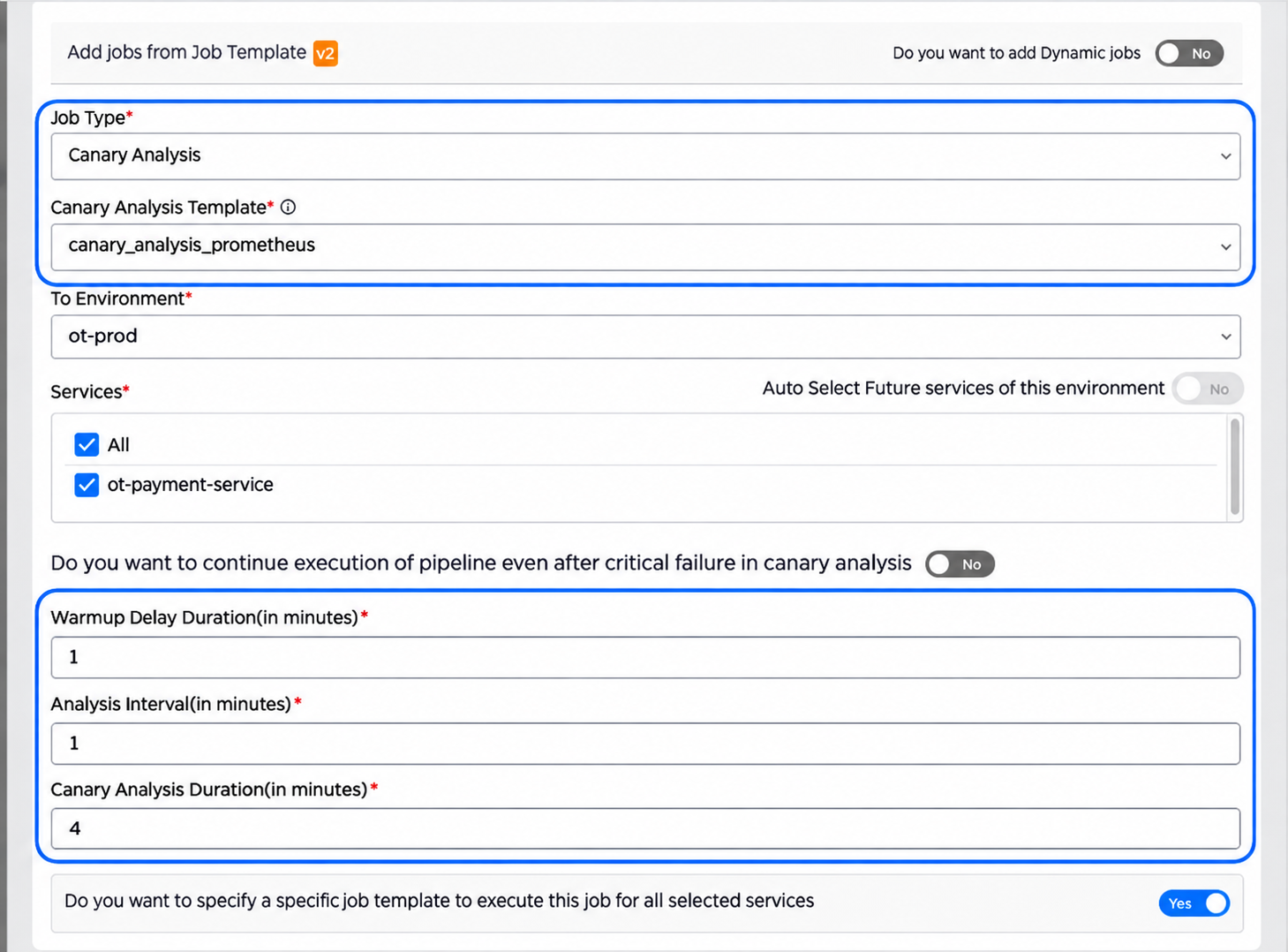
Canary Analysis Job of the Pipeline #
The Canary Analysis job contains configurations related to canary analysis. This is an optional configuration; it is only required when the users want to have automated canary analysis.
The canary analysis job needs a Canary Analysis Template that defines the metrics, thresholds and success criteria. To create one, see Canary Analysis Template.
The configuration details are below:
•Warmup Delay Duration •Analysis Interval •Canary Analysis Duration
1. Warmup Delay Duration #
Specifies the amount of time BuildPiper waits after deploying the canary version before starting the canary analysis.
This delay allows:
•The application to initialize completely.
•Pods to become healthy and ready to serve traffic.
•Metrics to stabilize before evaluation begins.
Without an adequate warmup period, temporary startup spikes or initialisation delays may result in inaccurate analysis.
2. Analysis Interval #
Defines the frequency at which BuildPiper collects and evaluates the configured metrics during the canary analysis.
For example:
•An analysis interval of 1 minute means the metrics are evaluated every minute.
•A shorter interval provides faster feedback but generates more frequent evaluations.
•A longer interval reduces the number of evaluations while allowing metrics to stabilise between analysis cycles.
3. Canary Analysis Duration #
Specifies the total duration for which the canary deployment is monitored and analysed.
Throughout this period, BuildPiper continuously evaluates the configured metrics at the specified analysis interval.
For example:
•Warmup Delay Duration: 2 minutes •Analysis Interval: 1 minute •Canary Analysis Duration: 10 minutes
In this scenario:
•BuildPiper waits 2 minutes after deploying the canary.
•It then evaluates the configured metrics every 1 minute.
•The analysis continues for 10 minutes before determining whether the canary deployment is successful or whether a rollback should be initiated.
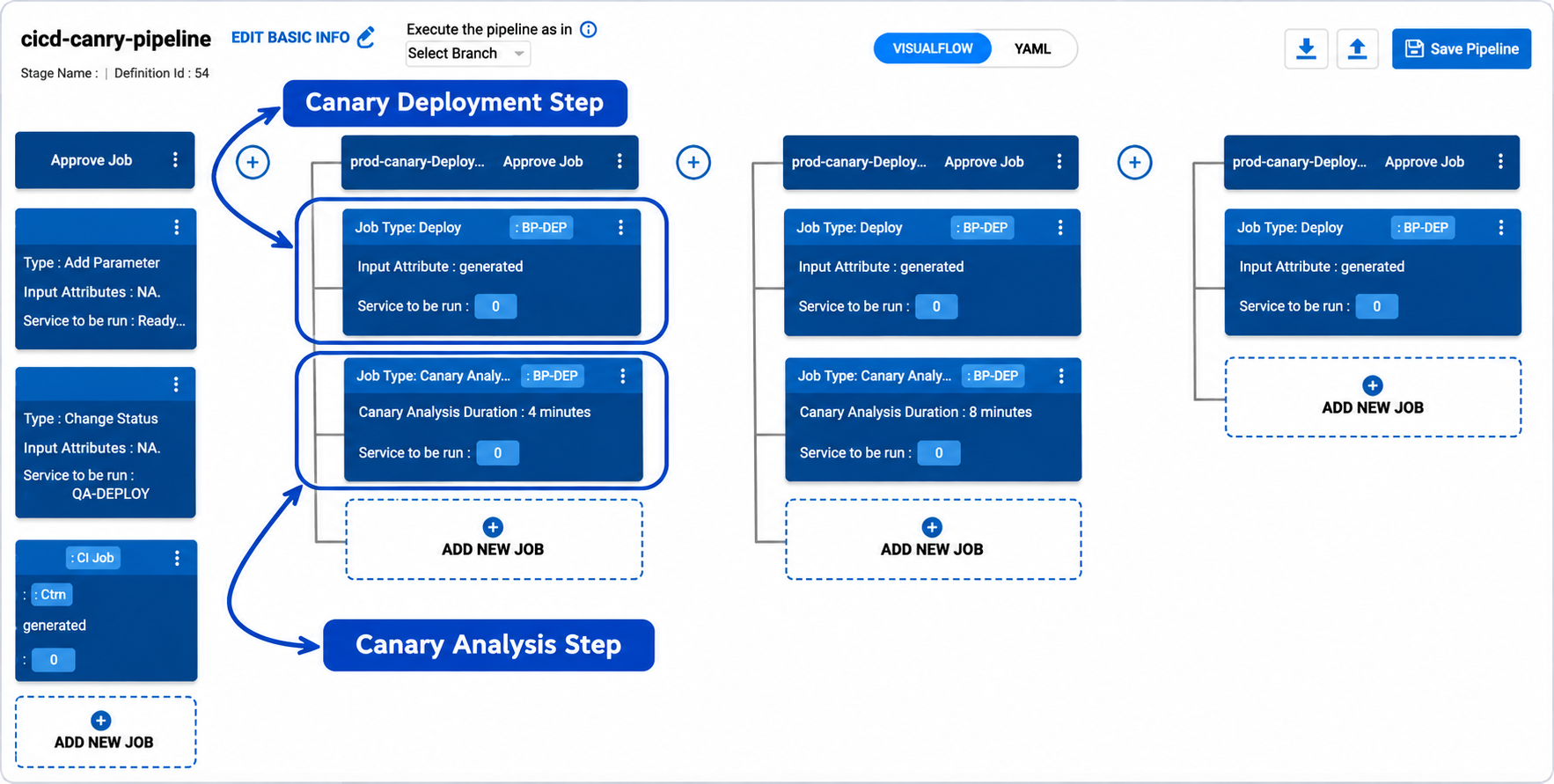
2.2 Pipeline Canary Workflow with Automated Approval #
A . An additional step of canary analysis will be added so that the metric analysis can happen after the canary deployment, and based on the metric calculation, the canary is auto-approved.
For what happens when the analysis fails, and how to give an Exceptional Approval or roll back, see Canary Approval and Rollback.
Related Documents #
For more information, refer to the following documents.
| Document | What It Covers |
|---|---|
| Canary Deployment | Concept, pod shift rollout and canary analysis overview |
| Canary Approval and Rollback | Failed analysis, Exceptional Approval and canary rollback |
| Monitoring Source | Adding a metrics endpoint as a monitoring source |
| Stability Matrix | Stability metrics and Stability Matrix Group |
| Canary Analysis Template | Mapping metrics into a canary analysis template |
| Deployment Strategies | Overview of deployment strategies and the job form |