

LDC Pipeline Definition #
1. LDC Pipeline Overview #
In BuildPiper, you can create an extensive pipeline for a VM-based service and configure the number of stages and jobs as per your process. A single pipeline can cover the full path of a release: ticket creation, build, deployment, promotion across environments, sign-offs and status updates.
| What You Can Configure | Description |
|---|---|
| Number of stages | Add as many stages as your release process needs. |
| Jobs in a stage | Add one or more jobs in each stage, such as Build, Deploy, Promote, add_comment and status_update. |
| Environments | Build, promote and deploy the same artifact across environments, for example dev and qa. |
| Trigger | Run the pipeline manually, as shown in the example below. |
Read more: Application Pipeline
Pipeline Configuration
Stage Configuration
Job Definitions
2. Example: PR-CI-STATUS #
The following pipeline, PR-CI-STATUS, is an example of an extensive pipeline for a VM-based service. It has 5 stages and is triggered manually. The retention is 50, and the last run took 11 minutes.
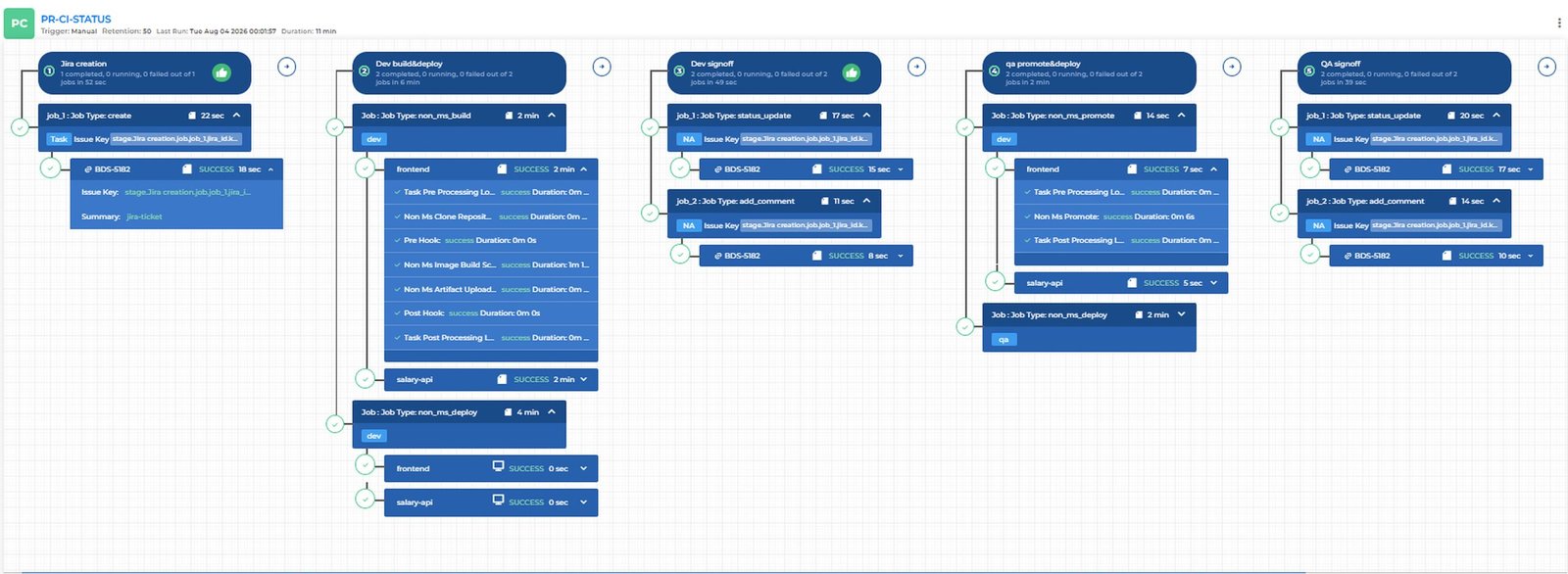
Figure 1: PR-CI-STATUS pipeline
| No. | Stage | Jobs |
|---|---|---|
| 1 | Jira creation | create |
| 2 | Dev build&deploy | non_ms_build, non_ms_deploy |
| 3 | Dev signoff | status_update, add_comment |
| 4 | qa promote&deploy | non_ms_promote, non_ms_deploy |
| 5 | QA signoff | status_update, add_comment |
3. Stage-by-Stage Walkthrough #
The sections below describe each stage of the example, based on what the pipeline execution screen shows.
Stage 1: Jira creation #
| Job | Type | What the Screen Shows |
|---|---|---|
| job_1 | create | Creates a Jira issue of type Task. The result shows the issue key (BDS-5182) and the summary (jira-ticket). |
Stage 2: Dev build&deploy #
| Job | Type | What the Screen Shows |
|---|---|---|
| non_ms_build | Build | Builds the services frontend and salary-api for the dev environment. |
| non_ms_deploy | Deploy | Deploys the services frontend and salary-api to the dev environment. |
Steps of the build job for the frontend service in this example:
- 1
Non Ms Clone Repository
- 2
Pre Hook
- 3
Non Ms Image Build Script
- 4
Non Ms Artifact Upload
- 5
Post Hook
Stage 3: Dev signoff #
| Job | Type | What the Screen Shows |
|---|---|---|
| job_1 | status_update | Updates the status of the Jira issue (BDS-5182). |
| job_2 | add_comment | Adds a comment to the Jira issue (BDS-5182). |
Stage 4: qa promote&deploy #
| Job | Type | What the Screen Shows |
|---|---|---|
| non_ms_promote | Promote | Promotes the artifact of the services frontend and salary-api from the dev environment. |
| non_ms_deploy | Deploy | Deploys to the qa environment. |
Steps of the promote job for the frontend service in this example:
- 1
Non Ms Promote
Stage 5: QA signoff #
| Job | Type | What the Screen Shows |
|---|---|---|
| job_1 | status_update | Updates the status of the Jira issue (BDS-5182). |
| job_2 | add_comment | Adds a comment to the Jira issue (BDS-5182). |
Note: This is only an example. You can add, remove or reorder stages and jobs to match your own release process.