

Stability Matrix #
This document explains how to define stability metrics and group them into a Stability Matrix Group. A monitoring source must be added first. See Monitoring Source.
What Is a Stability Matrix Group? #
A Stability Matrix Group is a collection of stability metrics that are evaluated together during canary analysis. Each metric in the group reads its data from a monitoring source, and the group is selected when you map metrics in a Canary Analysis Template.
A Metric is the fundamental unit of measurement collected from a monitoring source. It represents a single measurable attribute that can be evaluated during a canary deployment.
A metric definition contains the below:
| Attribute | Description | Example |
|---|---|---|
| Metric Name | It should clearly represent the metric being measured. | CPU Utilization, Memory Utilization, Request Success Rate, Error Rate |
| Monitoring Source | The monitoring platform or data source from where the metric is collected. | Prometheus, VictoriaMetrics, MongoDB, New Relic, REST API |
| Metric Query | Defines the query executed against the monitoring source to retrieve the metric data. The query syntax depends on the selected monitoring source. Examples include PromQL queries for Prometheus, aggregation queries for MongoDB, SQL queries. | avg(rate(container_cpu_usage_seconds_total[5m])) * 100 (PromQL), MongoDB aggregation pipeline, SELECT avg(cpu_usage) FROM metrics (SQL), GET /api/v1/metrics (REST API) |
| Value Path | Specifies the location of the required metric value within the response returned by the Metric Query. The value is extracted using an XPath expression for XML responses or a JSONPath expression for JSON responses. This allows the canary engine to identify and evaluate the correct metric from the query response. | $.metrics.cpu (JSONPath), $.data.result[0].value[1] (JSONPath), /response/metrics/cpu/value (XPath) |
A Matrix Group is a logical collection of related metrics that are evaluated together. Grouping metrics simplifies configuration, promotes reusability, and allows multiple metrics to be associated with a single analysis template.
For example:
| Matrix Group | Included Metrics |
|---|---|
| Infrastructure Health | CPU Utilization, Memory Utilization, Disk Usage, Network Throughput |
BP also supports Matrix Group Query. Instead of making separate calls for every individual metric, you can use a Matrix Group Query to fetch data for multiple metrics in a single request.
How it works:
BuildPiper executes the main query once against your monitoring source.
It pulls the precise metric values out of the payload using the configured Value Path (supporting both XPath and JSONPath).
In BuildPiper, the Stability Metric serves as the automated “pulse check” for the canary pods of your application. These stability metrics focus on resource consumption and memory health to ensure the new version isn’t “leaking” or over-consuming cluster resources in comparison with the earlier application versions.
Stability Metric Configuration #
| Matrix Group | Individual Metric | Primary Focus | Comparative Analysis |
|---|---|---|---|
| Infra-metric | CPU Metric | Resource Consumption | Compares millicore usage between the canary and the baseline (previous version) to detect sudden spikes or inefficient processing. |
| Infra-metric | Memory Metric | Memory Health | Monitors for “leaks” by tracking if the canary version consumes significantly more RAM over time compared to the stable version. |
Just as individual metrics act as a pulse check, a Stability Matrix Group acts as the collective “health score” for your application. In BuildPiper, you rarely rely on a single data point to judge a deployment; instead, you organize multiple stability metrics into a logical group to provide a comprehensive evaluation of the canary pods.
A Stability Matrix Group aggregates multiple stability metrics (such as CPU, Memory) into a single evaluative unit (like infra_metric). This group allows you to define a collective “Pass/Fail” policy for a canary release, ensuring that the new version is only promoted if all or a defined subset of the resource consumption factors remain within acceptable limits compared to previous versions.
The Stability Matrix Group is selected while mapping metrics in the Canary Analysis Template.
Configuring a Stability Matrix Group #
To add a Stability Matrix Group, open the Stability Matrix Group page in the User Portal. The page lists the groups that are already added, with their providers and metrics.
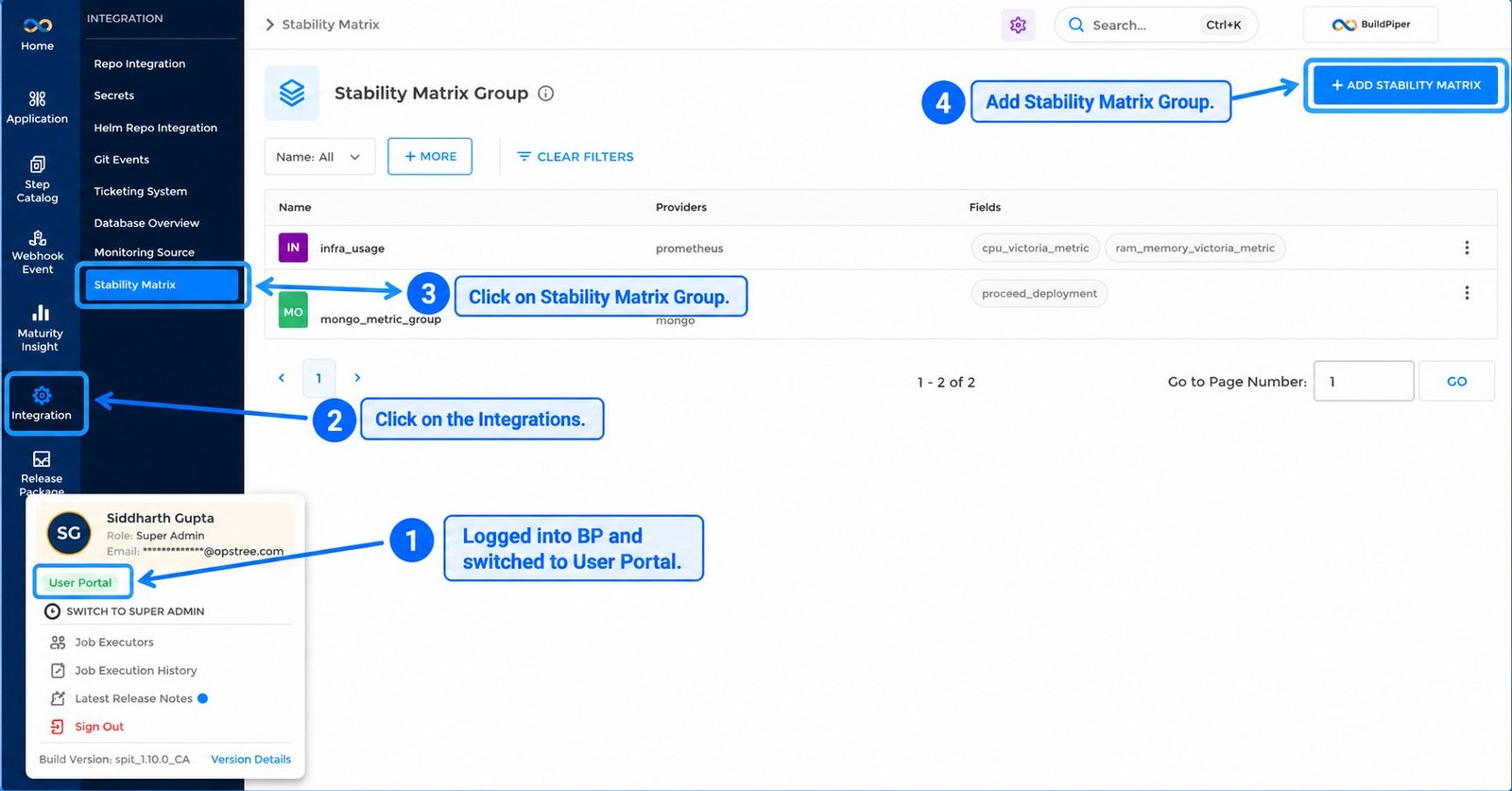
Figure 1: Navigating to Stability Matrix Group
Click your profile and select User Portal.
In the left navigation, click Integration.
Choose Stability Matrix.
Click + ADD STABILITY MATRIX.
After you click + ADD STABILITY MATRIX, the Add Stability Matrix Group page opens. Enter the group details, add the stability metrics and click ADD GROUP. The fields are described below.
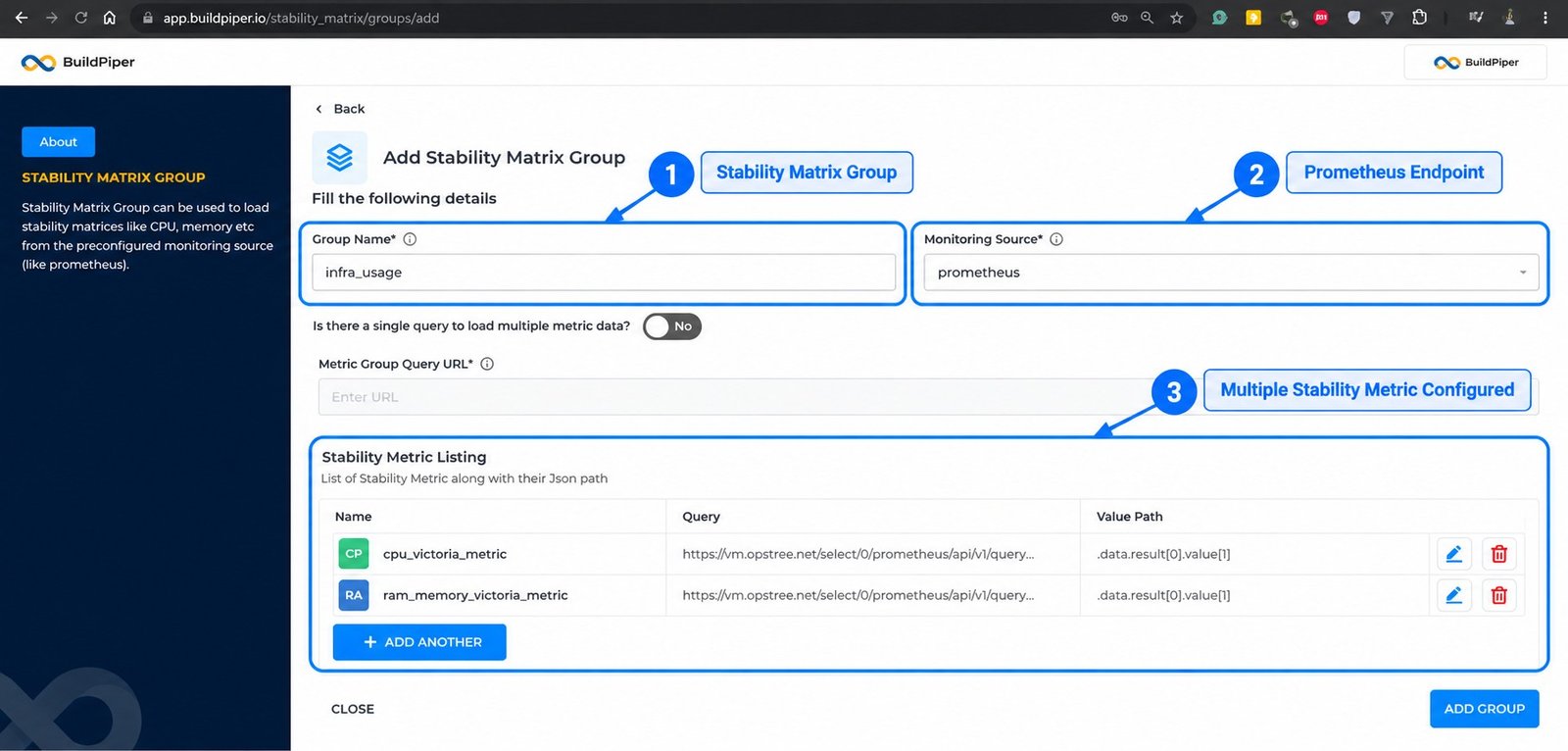
Figure 2: Add Stability Matrix Group
| Field | Mandatory | Description |
|---|---|---|
| Group Name | Yes | The name of the group for the metrics you want to track, for example infra_usage. |
| Monitoring Source | Yes | The monitoring source from which the metrics are measured, for example prometheus. See Monitoring Source. |
| Is there a single query to load multiple metric data? | No | Turn this on to fetch the data for multiple metrics with one query. See Matrix Group Query above. The default is No. |
| Metric Group Query URL | Yes, when the toggle is Yes | The query that defines how the metric values are obtained. |
| Stability Metric Listing | Yes | The list of stability metrics in the group, with the Name, Query and Value Path of each metric. Use the edit and delete icons to change or remove a metric, and click ADD ANOTHER to add one. |
Related Documents #
For more information, refer to the following documents.
| Document | What It Covers |
|---|---|
| Canary Deployment | Concept, pod shift rollout and canary analysis overview |
| Canary Setup and Pipeline | System settings, canary pipeline and job configuration |
| Canary Approval and Rollback | Failed analysis, Exceptional Approval and canary rollback |
| Monitoring Source | Adding a metrics endpoint as a monitoring source |
| Canary Analysis Template | Mapping metrics into a canary analysis template |
| Deployment Strategies | Overview of deployment strategies and the job form |