In addition
to the standard email and password login, BuildPiper supports several Single
Sign-On (SSO) and social authentication providers to streamline access and maintain security.
SSO configuration is
centralised within the System Settings dashboard and is accessible
exclusively via Admin credentials.
BuildPiper offers a seamless, plug-and-play SSO
configuration for standard providers like Okta, LDAP, and major Git platforms.
If your organisation uses a unique or non-standard authentication stack, BP’s extensible
architecture allows your team to easily integrate it via custom step
configuration — ensuring complete flexibility without being restricted by
out-of-the-box plugins.
BuildPiper SSO Setup (Day 0)
supports major enterprise SSO and social authentication. Configuration is centralised within the System Settings dashboard and is accessible exclusively via Admin
credentials.
Navigation
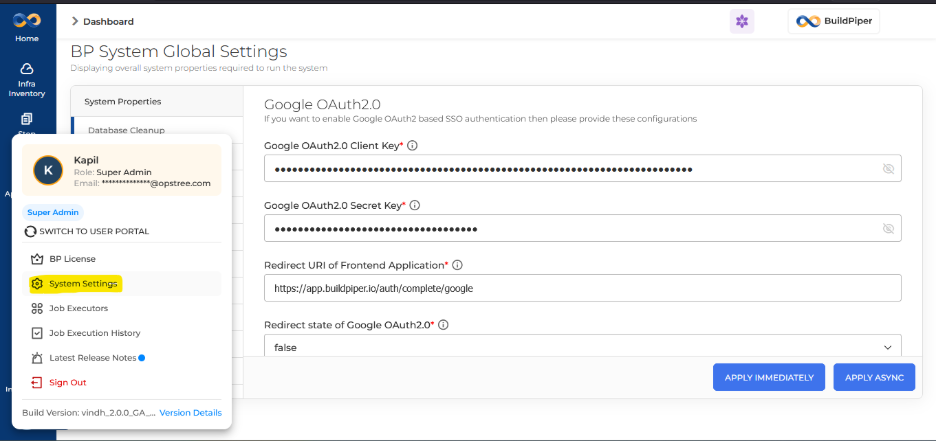
PathHow to Access System Settings
Login to BP
→
Bottom User Panel
→
System Settings
🔒 Admin credentials are required. Only
Super Admin users can access and configure SSO settings.
ℹ️
SOP Reference
Note
Refer to SSO – Google
Configuration (page 39) of the SOP document for detailed setup steps.
The SPOC installing BP on the client’s end must update the env.json with the relevant configuration once SSO is enabled.
To use Google OAuth2.0 you need to
create a Client ID and Secret from your Google OAuth2.0 provider, then
configure the values in BuildPiper System Settings.
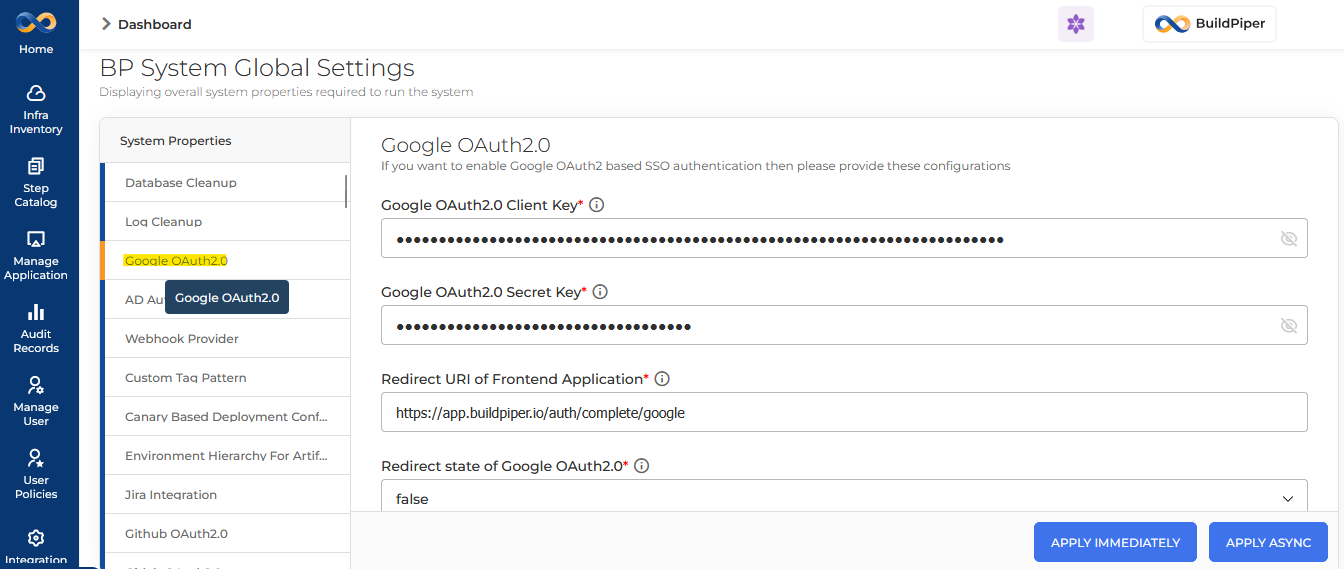
Google OAuth2.0 — System Settings Fields
Admin → System Settings → Google OAuth2.0
Field
Google
OAuth2.0 Client Key*Your Google
OAuth2.0 Client ID used for authentication.
Google
OAuth2.0 Secret Key*The Google
OAuth2.0 Secret Key used for authentication.
Redirect
URI of Frontend App*Example: https://app.buildpiper.io/auth/complete/google
Redirect
State of Google OAuth2.0*Set to false
unless your setup requires state validation.
✅
After saving
System Settings:Update the SSO URL for
Google in runtime-env.js
(non-root setup) or env.json
(root setup). The Google SSO Link URL must include the Client ID unique to each
client.
Configure GitHub OAuth2.0 within
BuildPiper System Settings. Generate a Client ID and Secret from GitHub
Developer Settings and fill in the required fields below.
🐙
GitHub OAuth2.0 — System Settings Fields
Admin → System Settings → GitHub OAuth2.0
Configuration
Description
GitHub OAuth2.0 Client ID
Unique client identifier generated from GitHub
Developer Settings used to identify the application during OAuth authentication.
GitHub OAuth2.0 Client Secret
Confidential secret key associated with the client
ID used to securely validate the authentication flow.
Redirect URI of Frontend Application
Callback URL where GitHub redirects the user after
successful authentication.
Authorization URL of GitHub OAuth2.0
GitHub endpoint used to initiate user login and
consent during OAuth authentication.
Access Token URL of GitHub OAuth2.0
Endpoint used to exchange the authorization code
for an OAuth access token.
Access Token Request Method of GitHub OAuth2.0
HTTP method (typically POST)
used to securely request the access token from GitHub.
GitHub REST API URL
Base API endpoint used by BP to fetch authenticated
user details and related information from GitHub.
Configure Bitbucket OAuth2.0 within
BuildPiper System Settings. Generate your credentials from Bitbucket Developer settings and fill in the fields
below.
🪣
Bitbucket OAuth2.0 — System Settings Fields
Admin → System Settings → Bitbucket OAuth2.0
Configuration
Description
Bitbucket OAuth2.0 Client ID
Unique client identifier generated from Bitbucket
Developer settings used to identify the application during OAuth authentication.
Bitbucket OAuth2.0 Secret ID
Confidential secret key associated with the client
ID used to securely validate the OAuth authentication flow.
Redirect URI of Frontend Application
Callback URL where Bitbucket redirects the user
after successful authentication.
Authorization URL of Bitbucket OAuth2.0
Bitbucket endpoint used to initiate user login and
consent for OAuth authentication.
Access Token URL of Bitbucket OAuth2.0
Endpoint used to exchange the authorization code
for an OAuth access token.
Access Token Request Method of Bitbucket OAuth2.0
HTTP method (typically POST)
used to securely request the access token from Bitbucket.
Bitbucket User Unique ID
Attribute used to uniquely identify the
authenticated user within Bitbucket.
Bitbucket Default Scope of Logged User
Defines the default permission scope granted to the
application for accessing Bitbucket user resources.
Configure OKTA SSO within BuildPiper
System Settings. Credentials are generated from the Okta application
dashboard. OKTA also supports PKCE for enhanced public client security.
🔐
OKTA — System Settings Fields
Admin → System Settings → OKTA
Configuration
Description
Redirect URI of Frontend Application for MI
Callback URL used for Microsoft Identity-based
redirection after successful Okta authentication.
Okta Client ID
Unique client identifier generated in the Okta
application used to identify BP during OAuth authentication.
Okta Secret Key
Confidential secret key linked with the Okta client
ID used to securely validate authentication requests.
Redirect URI of Frontend Application
URL where Okta redirects the user after successful
login and authorization.
Redirect State of OKTA
Parameter used to maintain request state and
prevent CSRF attacks during authentication.
Access Token URL of OKTA
Endpoint used to exchange the authorization code
for an OAuth access token from Okta.
Access Token Request Method of OKTA
HTTP method (typically POST)
used to securely request the access token.
Okta User Info URL
API endpoint used to retrieve authenticated user
profile details from Okta.
User Info Okta URL Method
HTTP method used to fetch user information from the
Okta user info endpoint.
User can use functionality of OKTA PKCE
Enables PKCE (Proof Key for Code Exchange) to
enhance security for public clients during OAuth authentication.