Admin & User PortalObservability● Real-Time
BP Health #
The Health Panel provides real-time visibility into the operational status of BuildPiper’s core microservices. A “Healthy” state indicates that the underlying containers, message queues, and API gateways are responsive and capable of processing deployment workflows.
Overview #
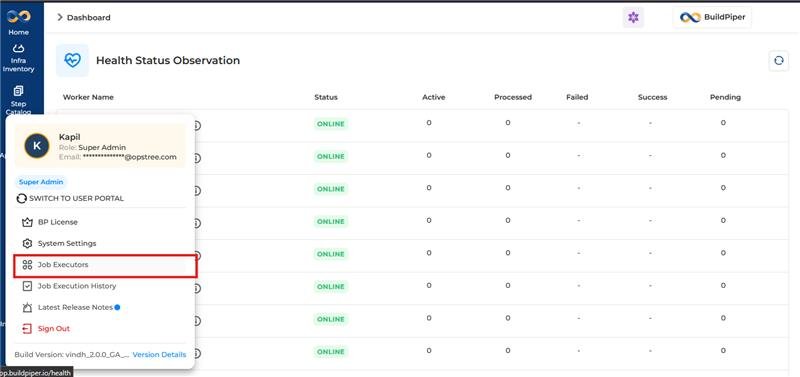
Once BuildPiper is operational, navigate to the Job Executors page and validate that all configured BP components are Online and in an Operational State.
ℹ️BP Health page is accessible on both the User Portal and Admin Portal. No special role is required to view health status.
How to Access / Navigate #
Navigation PathAccessing Job Executors
Login to BP
→
Bottom User Panel
→
Job Executors
Health Status Dashboard #
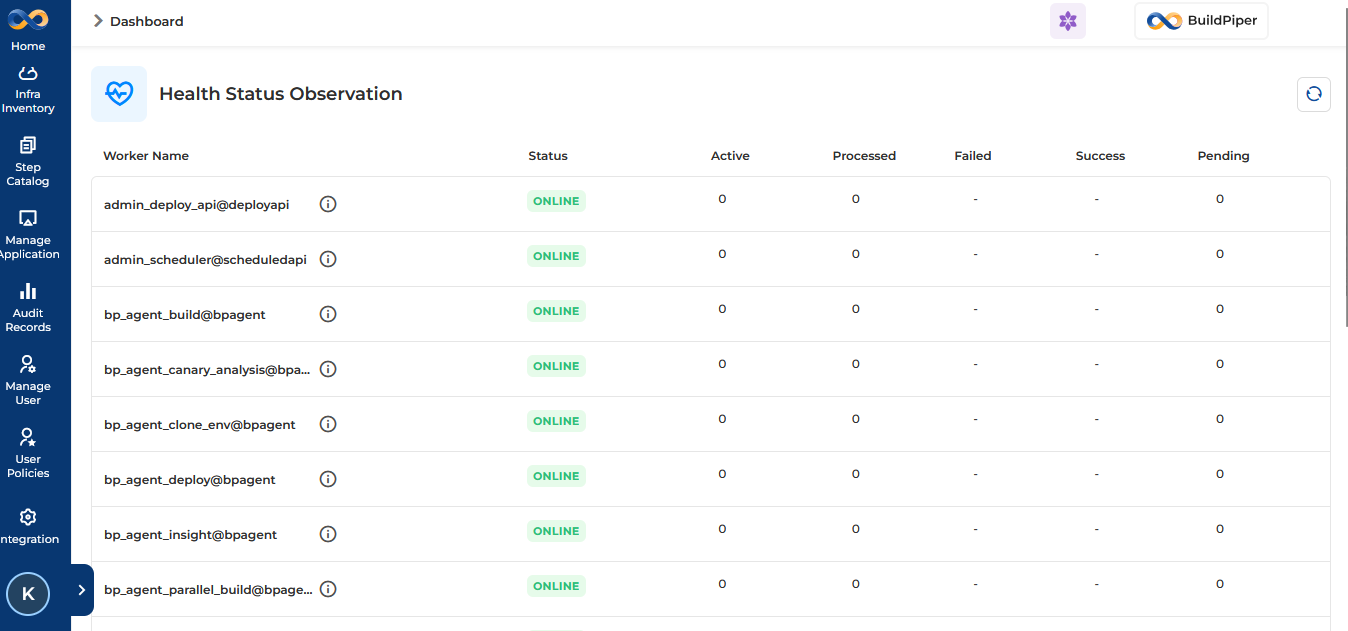
The Health Status Observation page lists every configured worker with its live status, active jobs, processed count, failures, successes, and pending tasks.
ScreenshotHealth Status Observation — Job Executor Page
Dashboard Column Reference
| Column |
Description |
| Worker Name |
Unique identifier of the worker process (e.g. bp_agent_build@bpagent) |
| Status |
ONLINE — worker is live and accepting tasks |
| Active |
Number of jobs currently being executed by this worker |
| Processed |
Total jobs picked up and processed from the queue |
| Failed |
Jobs that resulted in an error or did not complete successfully |
| Success |
Jobs that completed successfully end-to-end |
| Pending |
Jobs waiting in the queue to be picked up by a worker |
BP Workers #
BuildPiper operates through specialised worker types — each responsible for a distinct layer of the delivery pipeline. All workers must show ONLINE status for the platform to be fully operational.
Execute the core CI/CD pipeline operations inside BuildPiper.
▸Build operations
▸Deploy pipelines
▸Environment cloning
▸Insights & parallel execution
Manage time-based or event-based automation tasks.
▸Scheduled triggers
▸Event-based automation
▸Async task management
Manage deployment orchestration and API-driven deployment requests.
▸Deployment orchestration
▸API-driven deploy requests
▸Manifest & rollout processing
Additional supporting workers handling auxiliary platform functions.
▸Auxiliary platform operations
Manual Health Validation (CLI) #
While the UI provides a high-level overview, administrators can perform manual “heartbeat” checks directly from the BuildPiper VM. This is useful for troubleshooting when the UI is unreachable.
ExampleValidating the Public API Component
The publicapi component is mapped to port 9001 on the host VM. Use the following curl command to verify connectivity:
BASHRun from the BuildPiper VM
curl localhost:9001/api/v1/default/health/
Expected Response:
JSONSuccessful health check response
{
  "status": "success",
  "message": "success",
  "description": "Successfully hit to Public API"
}
status: success— Component is reachable and healthy
Connection refused— Component is down or port is wrong
📘 BuildPiper Documentation · BP Health
Last updated: March 2026