

Step Catalogue #
A Step is the smallest unit of work in BuildPiper – – a single action, like cloning a repository, running a security scan, building a docker image or pushing a Docker image.
Overview #
Shipping software involves a lot of repeated work – – checking out code, scanning for security issues, building images, sending notifications, and more. Without a shared way to do this, every team ends up building the same pieces on their own, which gets hard to manage and ensure consistency as pipelines grow.
The Step Catalogue solves this by giving BuildPiper one shared library of ready- to- use steps. A step is built once and then reused by any team, in any job, pipeline, application, or environment – instead of every team building it again from scratch.
What is a Step? #
A Step is the smallest unit of work in BuildPiper – – a single action, like cloning a repository, running a security scan, building a docker image or pushing a Docker image. A Job is just a group of Steps that run together to complete something bigger, like a full build or deployment.
Because each Step lives in the Step Catalogue, you define it once and reuse it everywhere it’s needed – – you don’t have to recreate the same build, test, deployment, or operational logic again and again. Everyone works from the same approved set of steps, built to your organisation’s standards, security policies, and best practices.
Key Capabilities #
A step can be created once and reused across multiple jobs and pipelines without redefining the execution logic.
Steps can accept input parameters, enabling dynamic execution based on environment, application endpoint, artifact version, or deployment target.
Organisations can ensure that all teams use approved and validated execution logic for critical activities such as security scanning, image creation, and production deployments.
A step’s output variables are the values it produces at runtime. These outputs can be used as inputs to another step’s environment variables — so output variables let you connect steps that would otherwise run independently within a job.
Step catalogue entries can integrate with the following:
Step Catalogue Reference #
| Step Name | Category | Dockerised | Description |
|---|---|---|---|
| Docker Build | Microservice | Dockerised | Creates container images from source code and Dockerfiles. |
| Clone Repository | Microservice | Dockerised | This dockerised step enables the cloning of the source code from the various supported Version Control System to Buildpier codebase. |
| Non Ms Image Builder | VM-Based | Non-dockerised | Builds an artifact using a user-provided container image and custom build instructions |
| IOS App Deploy to AppStore | Mobile-based | Dockerised | This dockerised step enables the clients to deploy their iOS applications to AppStore. |
| Android App Build | Mobile-based | Dockerised | This dockerised step enables the clients to build their applications using the Gradle build tool. |
| Trivy Vulnerability Scan | Security | Dockerised | Scans container images and software dependencies for known vulnerabilities. |
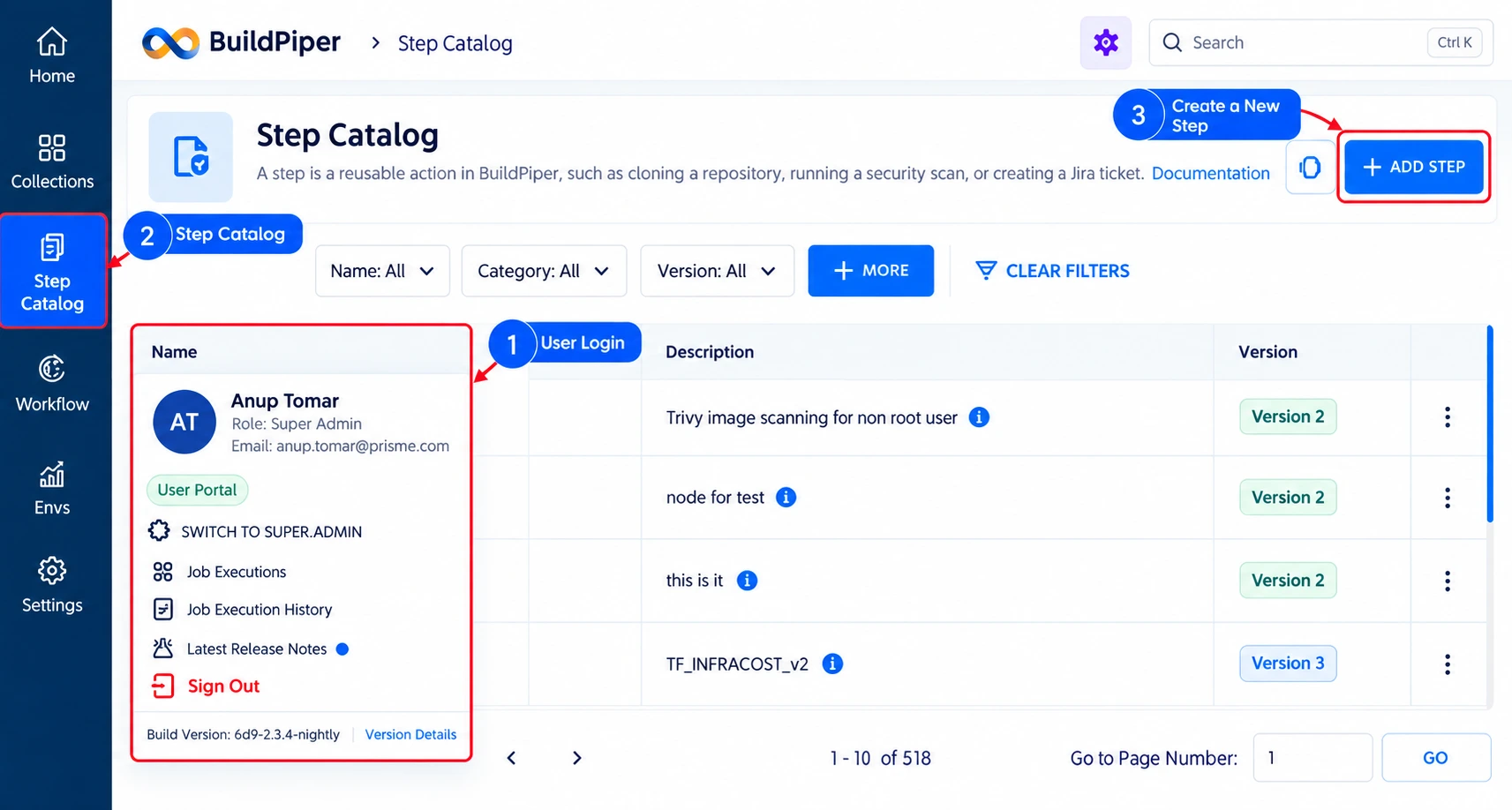
Workflow: How to Navigate to the Step Catalogue #
Note: BP Step Catalogue page is accessible inside both user and admin portal
BuildPiper Documentation · Step Catalogue
Last updated: September 2026