

BuildPiper Architecture #
BuildPiper is built on three planes. Each plane has its own job. Together they take your code from a commit all the way to a running application.
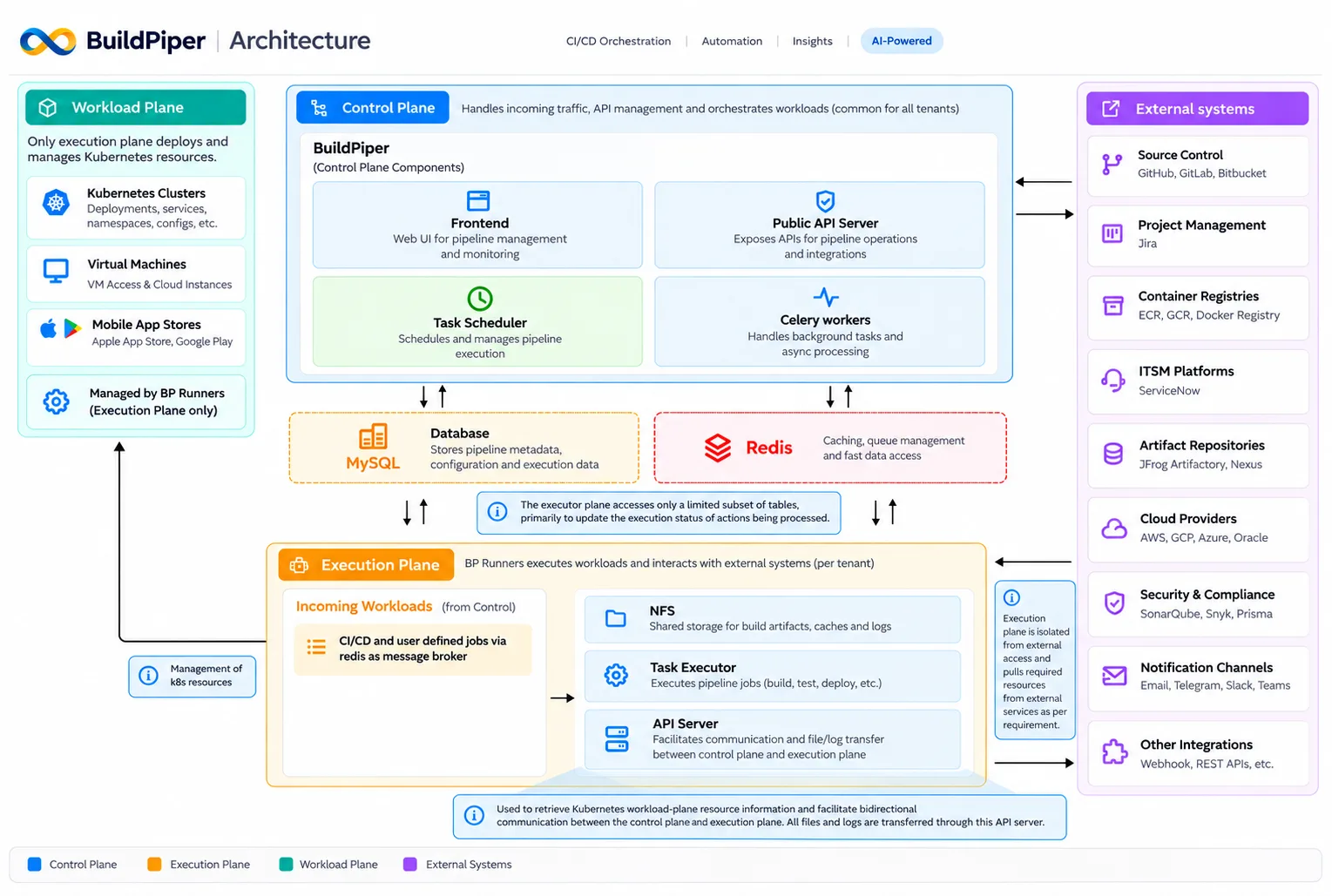
BuildPiper Architecture
1. Control Plane #
The Control Plane is the brain of BuildPiper. It is common for all tenants. It handles incoming traffic, manages APIs, and orchestrates the workloads that need to run.
Its main components:
| Component | Description |
|---|---|
| Frontend | The BuildPiper user interface. It is feature-rich, easy to use and intuitive. You configure BuildPiper and trigger jobs from here, and all user interactions happen through it. |
| Platform API | The core of BuildPiper. It exposes the REST API used to configure the product, set up microservices/vms/mobile apps and trigger jobs. It works with the Task Scheduler, the Execution Plane and the MySQL database to orchestrate all platform functions. |
| Task Scheduler | Schedules and manages all asynchronous tasks performed by the platform, so that they run in order and on time. |
| Celery Workers | Handle background tasks and asynchronous processing. |
Note: BuildPiper is asynchronous by design. The Platform API accepts a request and places it in a queue, the scheduler or the database. The BP Runners and the Task Scheduler then pick up the task, which keeps the platform scalable and non-blocking.
2. Execution Plane #
The Execution Plane is where the actual work happens. BP Runners execute the workloads and interact with external systems, and they run per tenant.
BP Runners are the orchestrator that executes the jobs and steps within the Job Template. A BP Runner picks jobs from the queue and runs them as consumers become available. CI/CD and user-defined jobs reach this plane from the Control Plane, with Redis acting as the message broker.
Autoscaling: BP Runners can be set up in autoscalable mode. When the load on the system increases and the queue depth grows, the infrastructure scales up automatically. This keeps the infrastructure needed during off-peak hours very low, and the system scales only when there is load.
Its main components:
| Component | Description |
|---|---|
| Task Executor | Executes the pipeline jobs that are sent from the Control Plane, such as build, test and deploy. |
| API Server | Retrieves Kubernetes workload-plane resource information and enables two-way communication between the Control Plane and the Execution Plane. All files and logs are transferred through this API server. |
| NFS | Shared storage for build artifacts, caches and logs. It also stores data about deployments, monitoring and more, and helps components such as the API servers and the runners stay in sync as the platform scales. |
Note: The Execution Plane is isolated from external access. It pulls the resources it needs from external services as required.
Note: The Execution Plane accesses only a limited set of database tables, mainly to update the execution status of the actions being processed.
3. Workload Plane #
The Workload Plane is where your applications actually run. It includes:
Kubernetes clusters #
Deployments, services, namespaces, configs, and more.
Virtual machines #
VM access and cloud instances.
Mobile app stores #
Apple App Store and Google Play.
Only the Execution Plane deploys to and manages these resources, through BP Runners.
Shared data stores #
The Control Plane and the Execution Plane use these common services.
| Component | Description |
|---|---|
| MySQL (Database) | The main database. It is the persistent store for all platform configuration and state data. |
| Redis | An open-source, in-memory data store. It is used as a cache layer for fast data retrieval, and for task queues. |
External systems #
BuildPiper connects with the tools your teams already use:
| Type | Examples |
|---|---|
| Source Control | GitHub, GitLab, Bitbucket |
| Project Management | Jira |
| Container Registries | ECR, GCR, Docker Registry |
| ITSM Platforms | ServiceNow |
| Artifact Repositories | JFrog Artifactory, Nexus |
| Cloud Providers | AWS, GCP, Azure, Oracle |
| Security & Compliance | SonarQube, Snyk, Prisma |
| Notification Channels | Email, Telegram, Slack, Teams |
| Other Integrations | Webhooks, REST APIs, etc. |