

Pipeline Overview #
BuildPiper enables the intuitive creation of feature-rich delivery pipelines for microservices, monolithic applications, and mobile apps, ensuring seamless, secure, and scalable product releases through a single unified platform.
Managing CI/CD pipelines for microservices, monolithic applications, and mobile apps becomes increasingly complex as the application landscape grows. BuildPiper provides a single platform to govern delivery pipelines across multiple teams, applications, environments, and clusters. Automated CI native checks and complete CI analysis identify defects and vulnerabilities in the initial stages, enabling a quick, compliant, and hassle-free code release.
Industry first: BuildPiper pipelines can manage the delivery process of all apps owned by a team through a single pipeline.
1. Pipeline Constructs #
A BuildPiper pipeline is composed of building blocks – stages, jobs, and steps.
Stage #
A logical grouping of jobs within a pipeline. Stages define when and how jobs run. For example, tests run only after code compilation.
Job #
A series of steps that run sequentially as a unit. Jobs define what to run, for example code compilation or a test run.
Step #
The smallest unit of work in a BuildPiper pipeline. Steps are the atomic operations that make up a job.
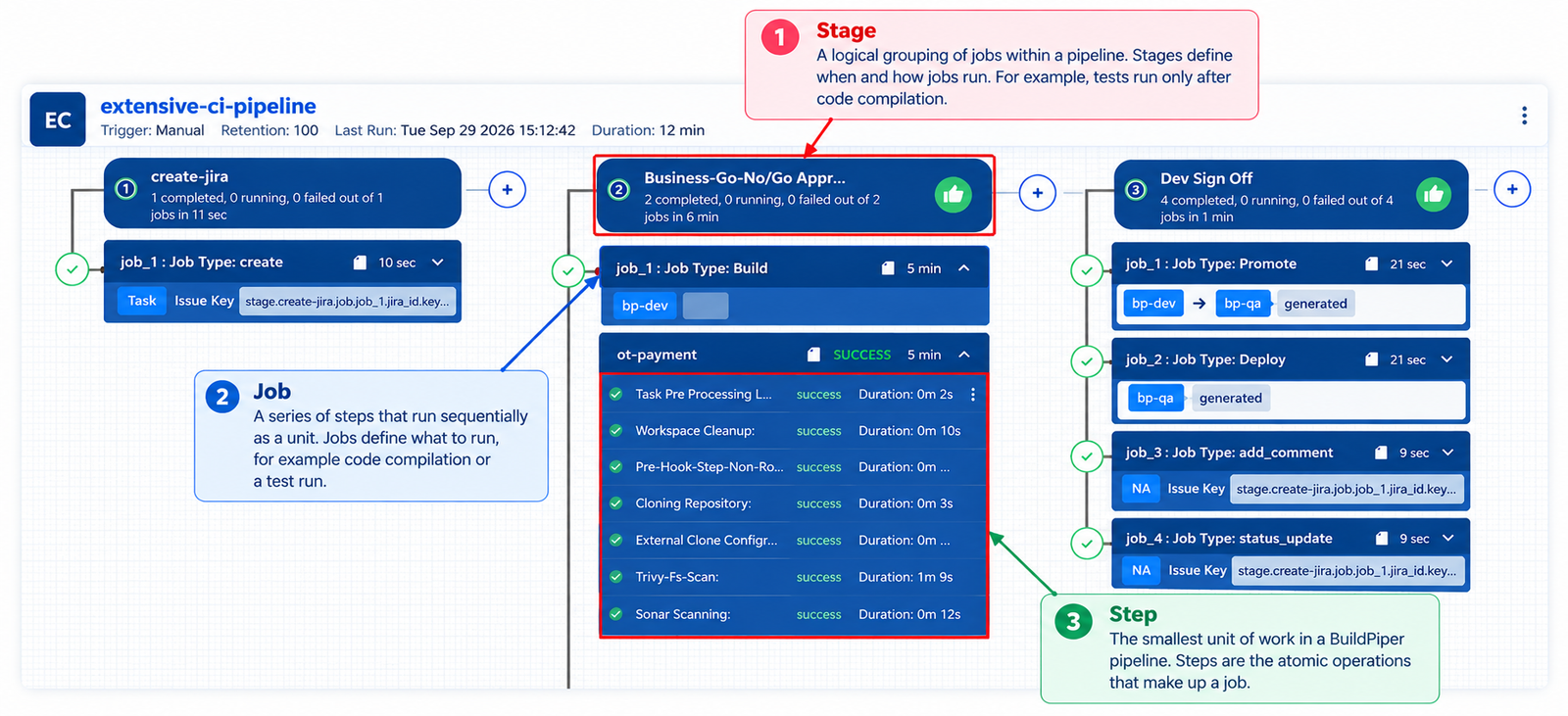
Figure 1: Pipeline construct hierarchy (stages, jobs, and steps)
2. Types of Pipelines #
BuildPiper offers two pipeline types, based on their scope and purpose.
Application Pipeline #
Scoped to a single application. Manages CI/CD for the services that belong to one application’s delivery lifecycle.
Global Pipeline #
Scoped across multiple applications. Handles cross-application orchestration, shared automation, and organisation-wide delivery patterns.
Each type is described in detail in its own document: Application Pipeline and Global Pipeline.
3. Pipeline Capabilities #
BuildPiper’s pipeline capabilities are grouped into four functional areas.
3.1 Authoring & Reach #
How pipelines are created, and which application types and environments they can deliver to.
Create and manage CI/CD pipelines through an intuitive UI, YAML & BPCTL with minimal manual configuration.
Manage delivery pipelines for Kubernetes-based apps, cron jobs, VM-based apps, and mobile apps from a unified platform.
Promote applications across development, QA, staging, and production environments.
Standardise delivery processes using pre-configured and reusable pipeline templates.
Native support for Kubernetes workloads, Helm charts, and containerised application delivery.
3.2 Automation & Strategy #
End-to-end automation across build, test, deploy, and release, with execution strategies that suit your risk profile.
Automate build, test, security validation, approvals, deployments, and release workflows.
Support for rolling and canary-based deployment strategies for safer releases.
Accelerate delivery with parallel job execution and condition-based workflow orchestration.
Build once and promote the same artifact across environments to ensure release consistency.
3.3 Governance & Security #
Embed control gates, security scanning, and access policies directly into the pipeline.
Configure manual approvals, policy controls, and deployment governance workflows.
Embed security scanning, compliance checks, and SAST integrations directly into the pipeline.
Enforce granular access control for users, teams, approvals, and deployment permissions.
3.4 Visibility & Operations #
Operational visibility, integrations with external tools, recovery mechanisms, and the ability to scale across the enterprise.
View pipeline-generated reports directly in the UI with built-in CSV rendering, without requiring external downloads.
Real-time visibility through alerts, logs, deployment tracking, and audit history.
Standard integration with JIRA and ServiceNow. Create, update, and add comments to a ticket.
Automated rollback and recovery mechanisms for failed or unhealthy deployments.
Centrally manage CI/CD pipelines across multiple teams, applications, environments, and clusters at scale.
Dedicated pipeline-level notification channels. A pipeline notification defines when to notify, whom to notify, and through which channel when a specific pipeline event occurs.