

Rolling Deployment #
1. What Is a Rolling Deployment? #
A rolling deployment is a deployment strategy in which the existing instances of an application are gradually replaced with new instances that run the updated version. Instead of updating all instances at once, the deployment proceeds in batches, so the application remains available during the update.
2. How It Works #
- 1
The new application version is prepared for deployment.
- 2
A portion of the existing instances is replaced with instances that run the new version.
- 3
The updated instances are checked to confirm that they are running correctly and are ready to handle traffic.
- 4
The next batch is updated once the deployment progresses according to the configured rollout settings.
- 5
The process continues until all targeted instances run the new version.
3. Key Benefits #
| Benefit | Description |
|---|---|
| No downtime (Temporary drawdown of capacity) | Helps maintain application availability during deployment. |
| Gradual updates | Replaces existing instances incrementally rather than all at once. |
| Resource efficiency | Reuses the available infrastructure instead of requiring a separate environment. |
| Health monitoring | Health checks help identify issues during the rollout. |
4. Example #
Suppose an application runs across five instances. During a rolling deployment, the system updates a subset of the instances at a time, while the remaining instances continue to serve requests. Once the updated instances are healthy, the rollout proceeds to the next batch until all five instances run the new version.
The following pipeline run shows a Deploy job that uses the Rolling strategy. The job lists the steps that it completed during the deployment, from the pre-processing and hooks to the rollout validation.
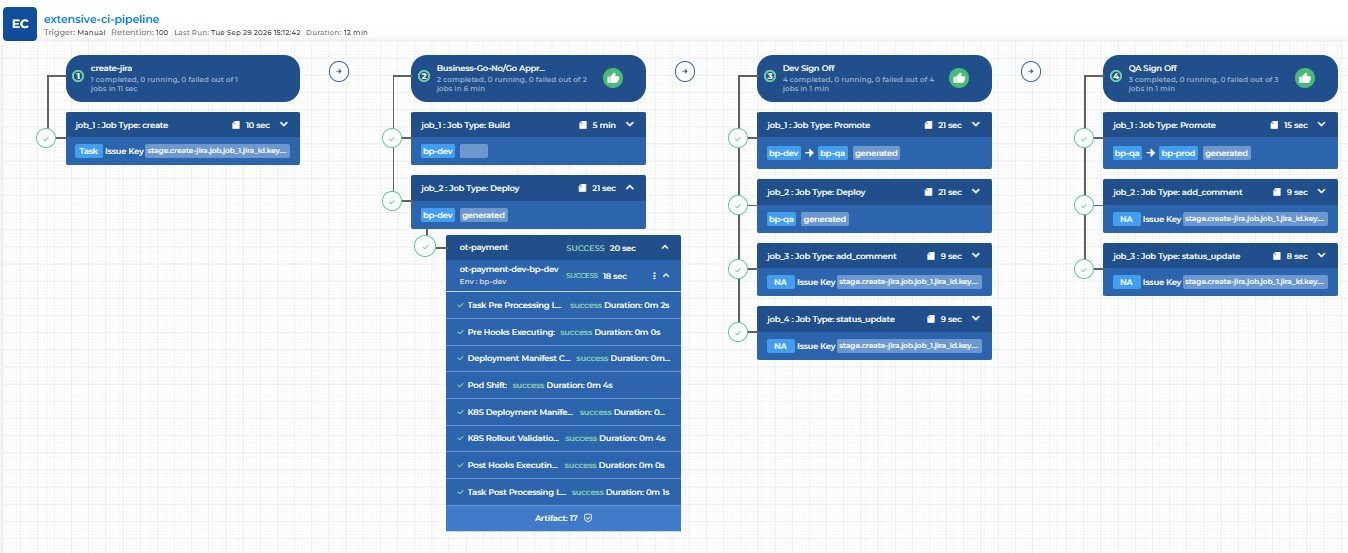
Figure 1: Pipeline run with a rolling deployment
To select the deployment strategy while you add a Deploy job to a pipeline, see Deployment Strategies.
Note: The actual availability depends on the rollout configuration, health checks, application capacity and infrastructure setup. A rolling deployment does not automatically guarantee zero downtime.
Related Documents #
For more information, refer to the following documents.
Read more: Deployment Strategies
Canary Deployment