

Application Pipeline #
An Application Pipeline is scoped to a specific application or team. It orchestrates build, test, and deployment for every service that belongs to that application.
1. Overview #
The Application Pipeline is designed for managing services that belong to a specific application or team. All services associated with that application can be referenced within the pipeline and configured collectively.
Application Pipelines are best suited for teams that operate and release independently. They let a team manage its own CI/CD processes, approvals, deployments, and release activities without dependencies on other applications or teams.
2. Why Application Pipelines #
This approach provides greater autonomy, faster release cycles, and streamlined application-specific delivery management. Each application or team has full ownership of its own CI/CD lifecycle, independent of other applications or teams on the platform.
3. Key Capabilities #
Multi-Service Build & Deploy #
Perform build and deployment operations for multiple services as part of a single application workflow.
Centralised CI/CD Configuration #
Apply a centralised CI/CD configuration to all services within the application.
Simplified Management #
Simplify management when multiple services need to be built, tested, and deployed together.
Coordinated Release Orchestration #
Ideal for application-specific release orchestration where dependent services need coordinated execution.
4. Sample Application Pipeline #
The screenshot below shows an executed Application Pipeline, with a stage-wise run across the application’s services.
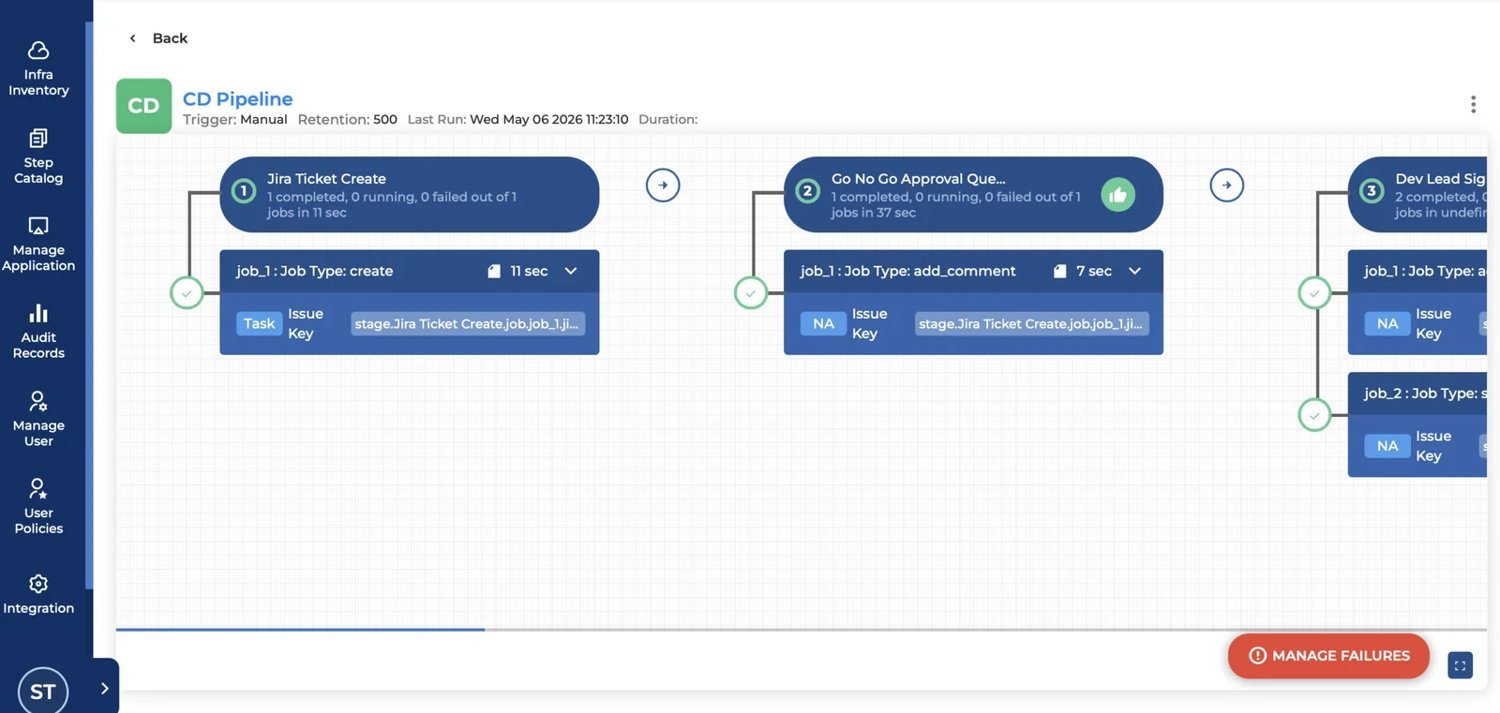
Figure 1: A sample Application Pipeline (CD Pipeline) showing stages, jobs, and the Manage Failures option
Also see: Application Pipeline vs Global Pipeline is compared in the Global Pipeline document.