

In Kubernetes, a CronJob is a resource that creates and runs Jobs according to a defined schedule. Common use cases include database backups, log cleanup, data synchronization, and routine maintenance activities.
BuildPiper allows you to configure cron jobs for a service, enabling scheduled tasks to run automatically without manual intervention.
| Capability | Description |
|---|---|
| Schedule | Configure task execution times and intervals using a cron expression. |
| Automate | Run recurring tasks automatically at the configured time or interval. |
| Suspend | Temporarily pause future scheduled runs. |
| Execute | Run tasks according to the defined schedule, with immediate execution available where supported. |
| Manage Workloads | Schedule operational tasks, including supported build and deployment activities, depending on the configuration and integration. |
The cron expression 0 2 * * * schedules a task to run every day at 2:00 AM, subject to the configured time zone.
To deploy a cron job, the service must have its CD details configured. If the details are missing, the DEPLOY DETAILS tab displays CD Details Not Configured and prompts you to select a method for configuring them.
1
2
3
4
5
6
7
8
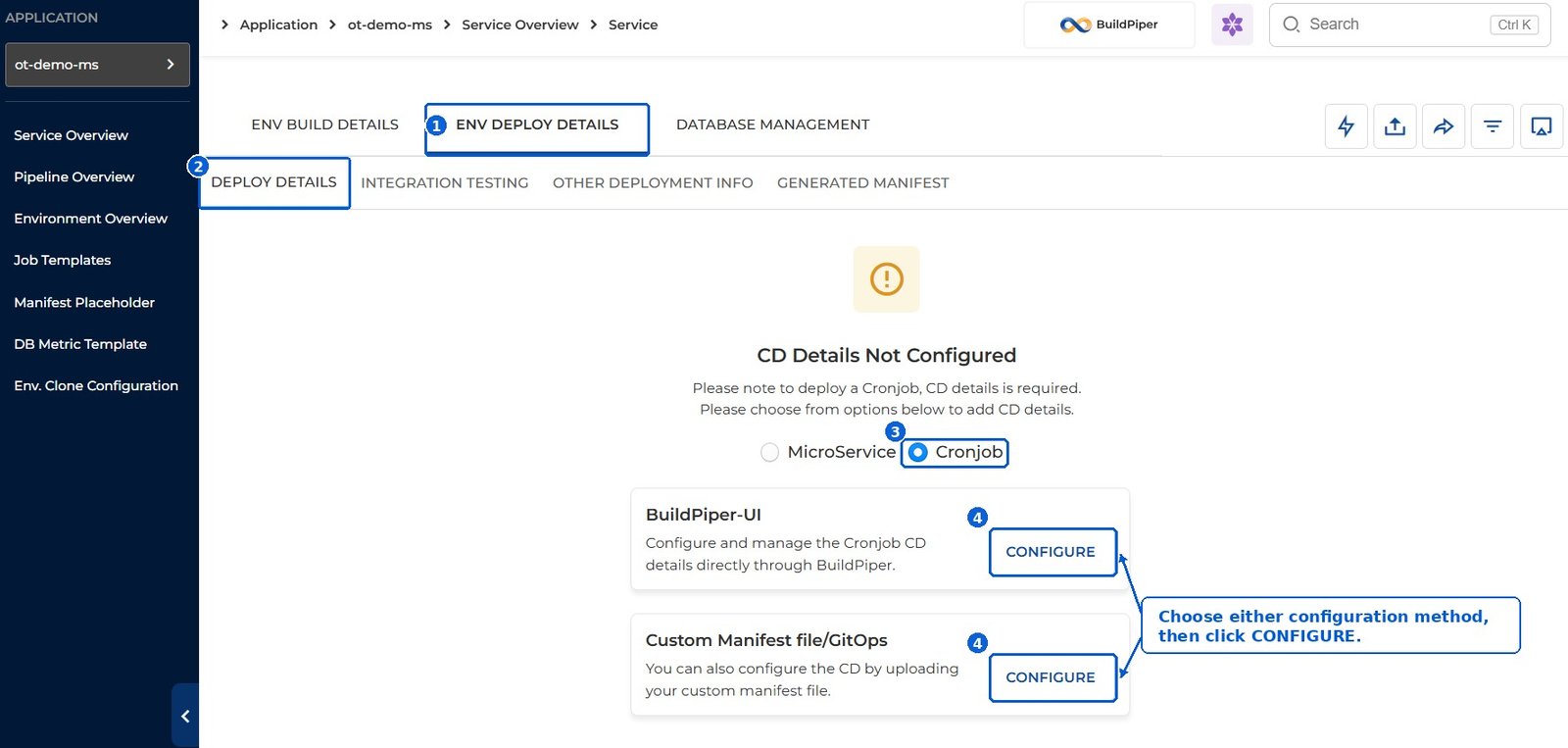
| Option | Description |
|---|---|
| BuildPiper-UI | Configure and manage the Cronjob CD details directly through BuildPiper. |
| Custom Manifest file/GitOps | Configure the CD by uploading your custom manifest file. |
| Capability | Description |
|---|---|
| Schedule | Configure task execution times and intervals using a cron expression. |
| Automate | Run recurring tasks automatically at the configured time or interval. |
| Suspend | Temporarily pause future scheduled runs. |
| Execute | Run tasks according to the defined schedule, with immediate execution available where supported. |
| Manage Workloads | Schedule operational tasks, including supported build and deployment activities, depending on the configuration and integration. |
| Option | Description |
|---|---|
| BuildPiper-UI | Configure and manage the Cronjob CD details directly through BuildPiper. |
| Custom Manifest file/GitOps | Configure the CD by uploading your custom manifest file. |