

VM Pipeline #
1. Pipeline Overview #
In BuildPiper, you can create an extensive pipeline for a VM-based service and configure the number of stages and jobs as per your process. A single pipeline can cover the full path of a release: ticket creation, build, deployment, promotion across environments, sign-offs and status updates.
| What You Can Configure | Description |
|---|---|
| Number of stages | Add as many stages as your release process needs. |
| Jobs in a stage | Add one or more jobs in each stage, such as Build, Deploy, Promote, add_comment and status_update. |
| Environments | Build, promote and deploy the same artifact across environments, for example dev and qa. |
| Trigger | Run the pipeline manually, as shown in the example below. |
Read more: Application Pipeline | Pipeline Configuration | Stage Configuration | Job Definitions
2. Dedicated Jobs for VMs #
A VM-based service supports three dedicated job types: Build, Promote, and Deploy. Each job executes independently for every service selected in its configuration. For example, if a job includes both frontend and salary-api, the pipeline generates a separate execution result for each service.
| Job Type | Action | Description |
|---|---|---|
| non_ms_build | Build | Clones the service repository, executes the image build script, and uploads the generated artifact for the selected environment. |
| non_ms_promote | Promote | Promotes the existing build artifact of each service from one environment to another (e.g., Dev to QA) without rebuilding it. |
| non_ms_deploy | Deploy | Deploys the corresponding service artifact to the selected target environment. |
3. Job Form Examples #
The following screenshots show the job forms for the three VM-specific job types.
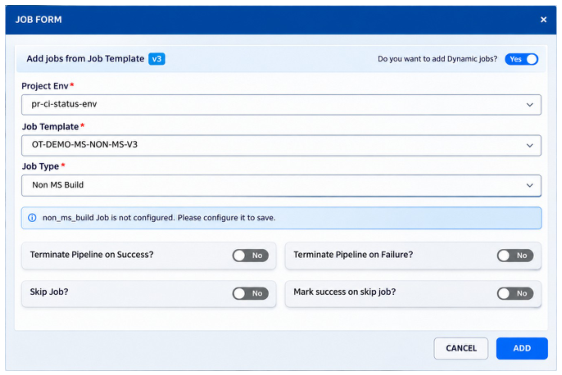
Figure 1: Job Form for the non_ms_build job
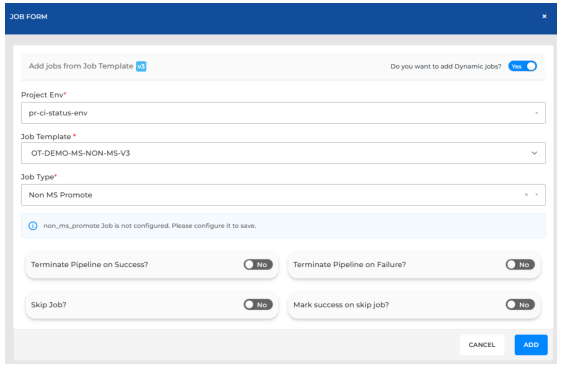
Figure 2: Job Form for the non_ms_promote job
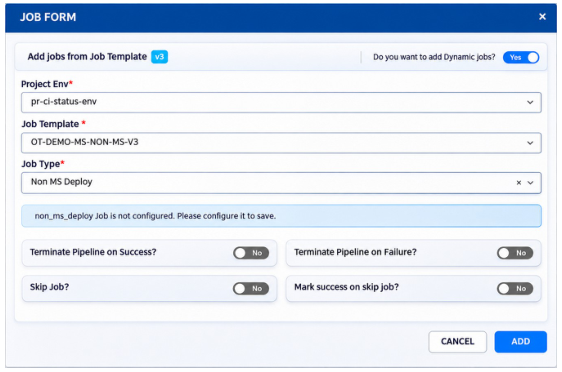
Figure 3: Job Form for the non_ms_deploy job
Figures 1–3: Job forms for non_ms_build, non_ms_promote and non_ms_deploy.
4. Example: PR-CI-STATUS #
The following pipeline, PR-CI-STATUS, is an example of an extensive pipeline for a VM-based service. It has 5 stages and is triggered manually. The retention is 50, and the last run took 11 minutes.
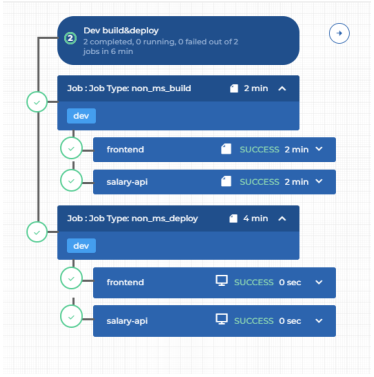
Figure 4: PR-CI-STATUS pipeline, Dev build&deploy stage
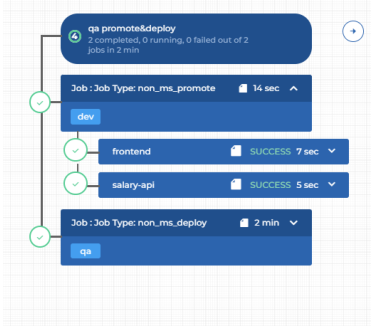
Figure 5: PR-CI-STATUS pipeline, qa promote&deploy stage
Figures 4–5: PR-CI-STATUS pipeline stages for Dev build & deploy and QA promote & deploy.
| No. | Stage | Jobs |
|---|---|---|
| 1 | Jira creation | create |
| 2 | Dev build&deploy | non_ms_build, non_ms_deploy |
| 3 | Dev signoff | status_update, add_comment |
| 4 | qa promote&deploy | non_ms_promote, non_ms_deploy |
| 5 | QA signoff | status_update, add_comment |
Note: This is only an example. You can add, remove or reorder stages and jobs to match your own release process.