

System Settings: Authentication #
The Authentication & Identity Management category contains settings that control how users authenticate and access BuildPiper. These include Single Sign-On (SSO) providers, Active Directory integration, multi-factor authentication (MFA), account lockout policies, and sign-in restrictions. The category includes 14 settings.
Note: Keep a working admin session open when you change any sign-in setting. Treat client secrets, passwords and private keys as credentials.
1. Open the Category #
- 1
Open System Settings.
- 2
Select Authentication & Identity Management.
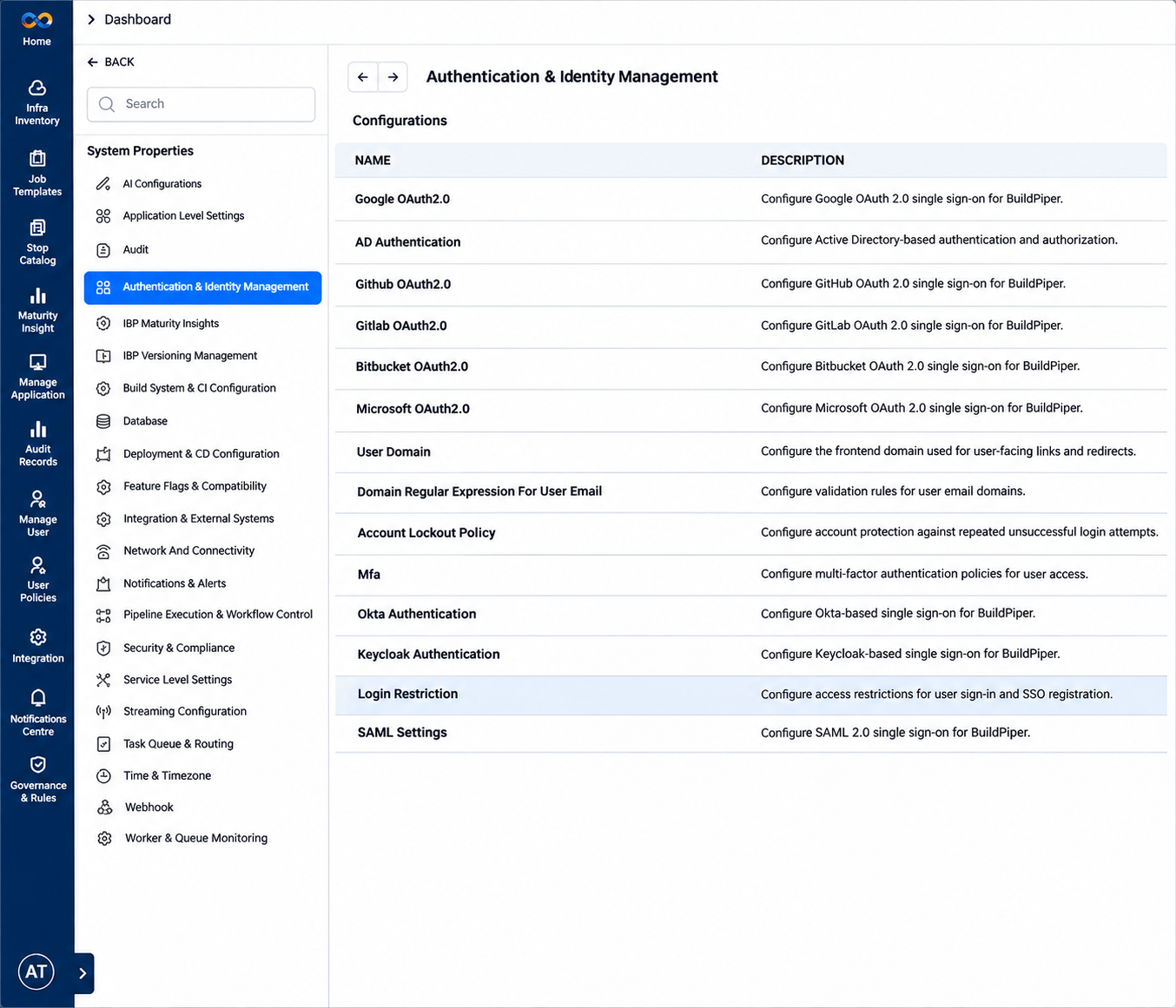
Figure 1: Authentication & Identity Management, Configurations table
2. Single Sign-On Providers #
Each SSO provider has its own setting in this category. The fields and setup steps of each provider are described in the Login and SSO document.
| Setting | Description |
|---|---|
| Google OAuth 2.0 | Enables users to sign in to BuildPiper using their Google accounts through OAuth 2.0 authentication. |
| GitHub OAuth 2.0 | Enables users to authenticate with their GitHub accounts to access BuildPiper, simplifying sign-in for development teams. |
| GitLab OAuth 2.0 | Enables users to sign in to BuildPiper using their GitLab accounts through OAuth 2.0 authentication. |
| Bitbucket OAuth 2.0 | Enables users to authenticate with their Bitbucket accounts to access BuildPiper through OAuth 2.0. |
| Microsoft OAuth 2.0 | Enables users to sign in to BuildPiper using their Microsoft accounts through OAuth 2.0 authentication. |
| Okta Authentication | Configures Okta-based single sign-on (SSO) to authenticate users accessing BuildPiper. |
| Keycloak Authentication | Configures Keycloak-based single sign-on (SSO) for user authentication in BuildPiper. |
| SAML Settings | Configures Security Assertion Markup Language (SAML) 2.0 single sign-on (SSO) to enable federated authentication for BuildPiper users. |
3. Other Sign-In Settings #
User Domain #
Sets the frontend domain that is used for user-facing links and redirects.
| Field | What it does |
|---|---|
| User Domain | The frontend URL used in notifications, redirects and links that BuildPiper generates. |
Domain Regular Expression For User Email #
Sets the validation rules for user email domains.
| Field | What it does |
|---|---|
| Regular Expression for User Domain | One or more regular expressions that validate the allowed email domains during registration and invitation. |
| Enable Hyperboost | Turns on the Hyperbuild feature, which speeds up builds through acceleration and caching. The UI shows it on this panel. It is the switch for the Hyperbuild Enable setting in the Build and CI document. |

Figure 2: Domain Regular Expression For User Email setting
Account Lockout Policy #
Protects accounts against repeated unsuccessful sign-in attempts.
| Field | What it does |
|---|---|
| Max Unsuccessful Login Attempts | The number of consecutive failed sign-ins allowed before the account is locked. |
| Account Lockout Enable | Turns on the lockout policy. |

Figure 3: Account Lockout Policy setting
MFA #
Sets the multi-factor authentication (MFA) policy for user access.
| Field | What it does |
|---|---|
| Enable Multi Factor Authentication | Requires a one-time password (OTP) at sign-in. |
| Define MFA Token Attempts | The number of invalid OTP attempts allowed before the MFA session is invalidated. |
| Define MFA Token Expiry Time in Minutes | How long an OTP stays valid. |
| Define MFA Token Resend Time in Minutes | The minimum wait before another OTP can be requested. |
| Define MFA Resend Limit | The maximum number of OTP resends in one MFA session. |

Figure 4: MFA setting
Login Restriction #
Restricts who can sign in, and who can register through SSO.
| Field | What it does |
|---|---|
| Allow Uninvited SSO User | Lets users who authenticate through SSO sign in without a prior invitation. |
| Allowed Email Domains for SSO | The email domains whose users may sign in through SSO. |
Read more: System Settings Overview
Identity Provider Configuration
Login and SSO